
Best Gaming Monitor With Speakers: 5 Picks With Sound You Can Actually Use
Five gaming monitors with built-in speakers, ranked by speaker wattage and placement — so you know which ones sound good without a soundbar.


Most gaming monitors treat speakers as an afterthought: two tiny drivers on the back, quiet and muffled, there only so the box can say “built-in speakers”. A gaming monitor with speakers worth buying is different — the drivers face you, the wattage is stated honestly, and the sound is loud and clear enough for a whole evening of play without a soundbar or headphones. This guide ranks five monitors by what actually decides the sound: speaker wattage, speaker placement, and whether each one is usable with no external audio at all.
Short answer
A gaming monitor with speakers worth buying has front-facing drivers of 2 watts or more per channel, or a subwoofer, so voices and game sound stay clear at normal volume. The BenQ MOBIUZ EX2710Q is the pick: its 2.1-channel treVolo system is the only one here with a subwoofer.
Find your pick at a glance
-
Best overall
BenQ MOBIUZ EX2710Q
Only one with a subwoofer; genuinely usable alone.
-
Best 4K
Gigabyte M28U
4K 144 Hz, HDMI 2.1, USB-C and KVM.
-
Best for PC + work
Gigabyte M27Q
170 Hz and KVM; weakest speakers here.
Who this guide is for
This guide is for gamers who want one screen and no extra boxes on the desk. If your room is small, your desk is crowded, or you just do not want another gadget and another cable, built-in speakers are the simple answer — as long as you pick a monitor whose speakers were designed to be heard, not just listed on the box.
This is for you if
- You want one screen and no extra boxes on your desk.
- You play in a small room where a soundbar would be overkill.
- You watch videos and play games on the same monitor.
Look elsewhere if
- You want cinema bass or surround sound.
- You play competitive games where footsteps decide the round — use headphones.
- You already own speakers you like.
Check this before you buy
The check that decides this purchase is not the panel — it is the speakers. A fast 144 Hz panel with bad speakers still leaves you buying a soundbar. Check placement and wattage first, then the panel.
Three things to check
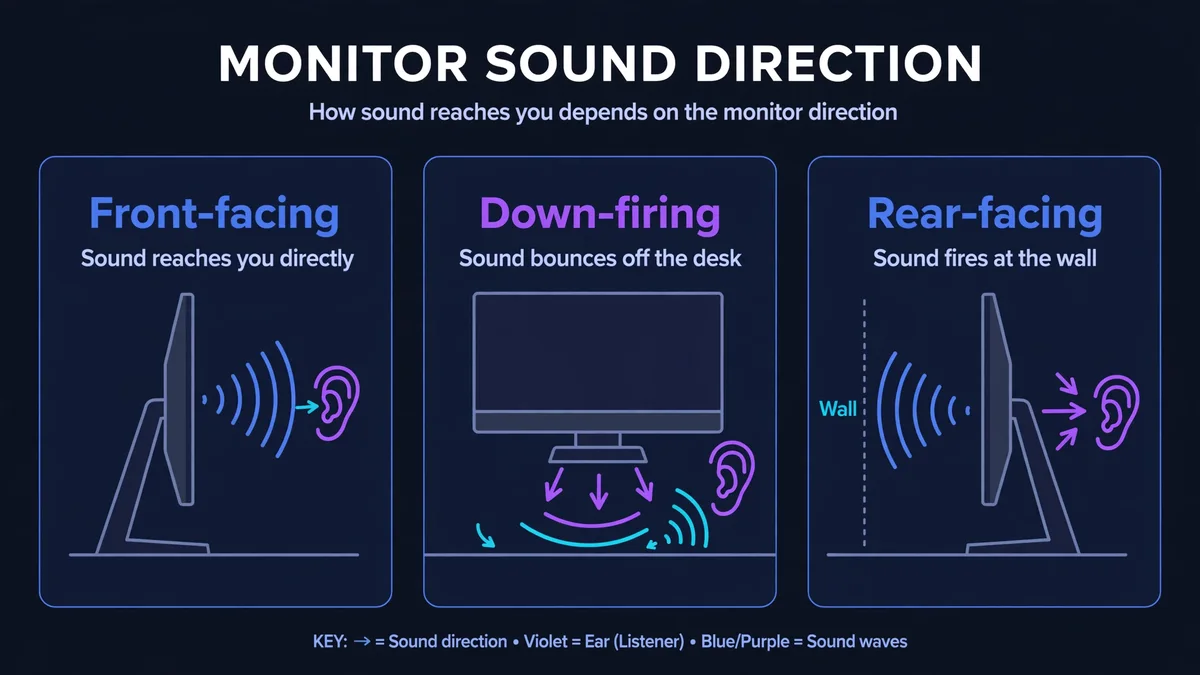
- Speaker placement Front-facing drivers send sound straight at you. Down-firing or rear-facing drivers lose volume and clarity before the sound reaches your ears.
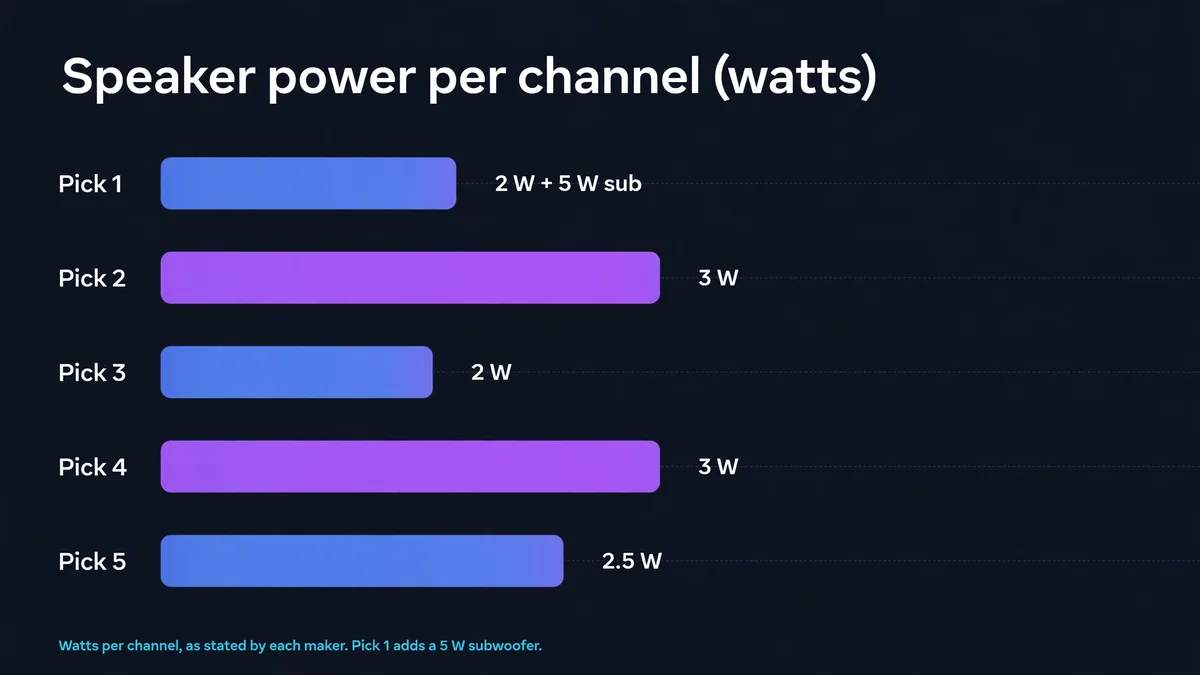
- Wattage per channel Two watts per channel is the floor for clear sound at a desk. Three watts is louder. A subwoofer adds the bass no small driver can make.
- Your room A 2 W pair is fine in a small, quiet room. In a big or noisy room, even 3 W speakers sound thin, and headphones or a soundbar make more sense.
Why monitor speakers are usually bad
Monitor speakers are usually bad for three plain reasons. First, the drivers are tiny — a 2 W driver is about the size of a coin, and a coin-sized driver cannot move much air, so bass is the first thing to go. Second, the drivers usually point the wrong way: down at the desk or back at the wall, so the sound reaches you after bouncing off something. Third, the cabinet is thin. A monitor is a flat panel with no room for a speaker box, so there is nowhere for sound to build up.
None of this is an accident. The panel is what sells a monitor, so the maker’s budget goes to refresh rate, colour and HDR, and the speakers get whatever is left. That is why two monitors with the same “built-in speakers” line on the box can sound nothing alike — one has front-facing drivers and a stated wattage, the other has two unnamed drivers on the back. This guide only recommends monitors where the maker states the wattage and the placement can be checked.
How to pick a gaming monitor with speakers
Start with placement, then wattage. Front-facing drivers point straight at you, so you hear the full sound at normal volume. Down-firing drivers point at the desk and lose clarity on the bounce. Rear-facing drivers point at the wall behind the monitor and lose the most. The placement diagram below shows the difference at a glance.
Wattage is the honest number. Every maker in this guide states it, and it tells you how loud the sound can get before it distorts. Two watts per channel is the floor: clear enough for a quiet room, but thin when the game gets loud. Three watts is a clear step up in volume. A subwoofer is a bigger step still, because bass is what small drivers cannot make at any wattage — the EX2710Q is the only pick here with one, and that is why it tops the list.
Sound modes help, but they do not fix bad drivers. BenQ’s treVolo tuning adds a DSP with three sound modes on both BenQ picks, and it does make voices clearer — but it cannot give a 2 W rear-facing driver the body of a front-facing one. Treat sound modes as a bonus, not a reason to buy.
How GameVexo chose
These five were chosen from manufacturer spec sheets and datasheets, ranked by speaker wattage and placement first and panel second. A monitor only made the list if its maker states the speaker wattage in plain figures.
How we researched this
- Spec sheets from each maker, or the maker’s own datasheet, were compared in November 2026. Speaker wattage and placement were weighted first; panel speed and resolution second.
- Only monitors whose maker states the speaker wattage are in this guide. A monitor with unnamed speakers cannot be ranked honestly, so it was left out.
- Models that are out of stock, or have no speakers in the US version, were left out, even when their specs looked better.
- Specifications and rated figures come from manufacturer documentation. GameVexo does not physically test products — see how we research.
Quick comparison
All five have built-in speakers, but the wattage and the placement are very different. The columns that matter most are speakers and panel.
| Product | Speakers | Panel and refresh | Best for | Link |
|---|---|---|---|---|
| BenQ MOBIUZ EX2710QBest overall | 2.1ch: 2 W x 2 + 5 W subwoofer | 27" IPS 1440p, 165 Hz | Best overall | Amazon Paid link |
| Gigabyte M28UBest 4K | 3 W x 2 | 28" SS IPS 4K, 144 Hz | Best 4K | Amazon Paid link |
| Gigabyte M27QBest for PC + work | 2 W x 2 | 27" SS IPS 1440p, 170 Hz | Best for PC + work | Amazon Paid link |
| Dell 27 Plus QHD S2725DSMBest value | 3 W x 2 | 27" IPS 1440p, 144 Hz | Best value | Amazon Paid link |
| BenQ MOBIUZ EX2710Best 1080p / budget | 2.5 W x 2 | 27" IPS 1080p, 144 Hz | Best 1080p / budget | Amazon Paid link |
What the table does not show
Wattage is per channel, and the subwoofer is separate — the EX2710Q’s 5 W woofer is not part of its 2 W figure. Placement is not a number either: the two BenQ picks fire forward, while most rivals fire down or back. Read the placement section above before you buy on watts alone.
The five picks
Pick 1 · Best overall
BenQ MOBIUZ EX2710Q
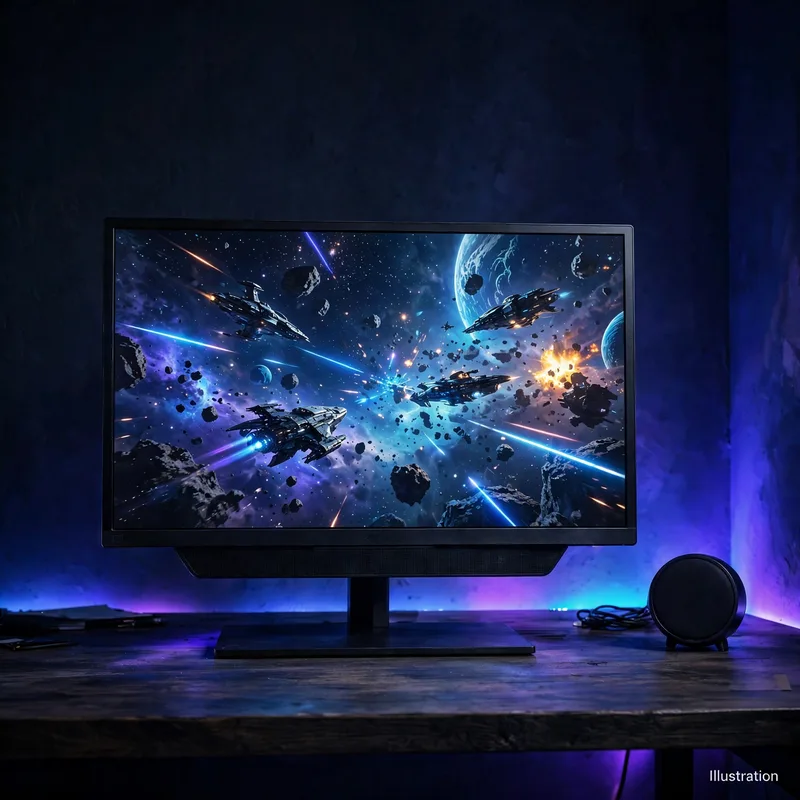
Best for a desk with no extra speakersThe only pick with a real subwoofer: two 2 W front speakers plus a 5 W woofer, tuned by treVolo with a DSP. On its own it fills a small room with clear voices and real bass — the only monitor here you can buy and never plug anything else into. If 1440p is your target, see our best 27-inch 1440p gaming monitors guide.
- Speakers
- 2.1ch treVolo, 2 W x 2 + 5 W subwoofer
- Panel
- 27" IPS, 2560 x 1440
- Refresh rate
- 165 Hz
- Response time
- 1 ms MPRT / 2 ms GtG
- Inputs
- 2x HDMI 2.0, DP 1.4, USB hub
- Brand
- BenQ
Strengths
- Only pick with a subwoofer — real bass
- 165 Hz at 1440p, 1 ms MPRT
- 95% DCI-P3 colour
Trade-offs
- No USB-C or KVM
- 2 W satellites are small without the sub
- HDMI 2.0, not 2.1
Editorial opinion
Buy it if you want sound with no extra gear. For 4K or USB-C, buy the Gigabyte M28U.
Price and availability change often — check the current listing.
Pick 2 · Best 4K
Gigabyte M28U
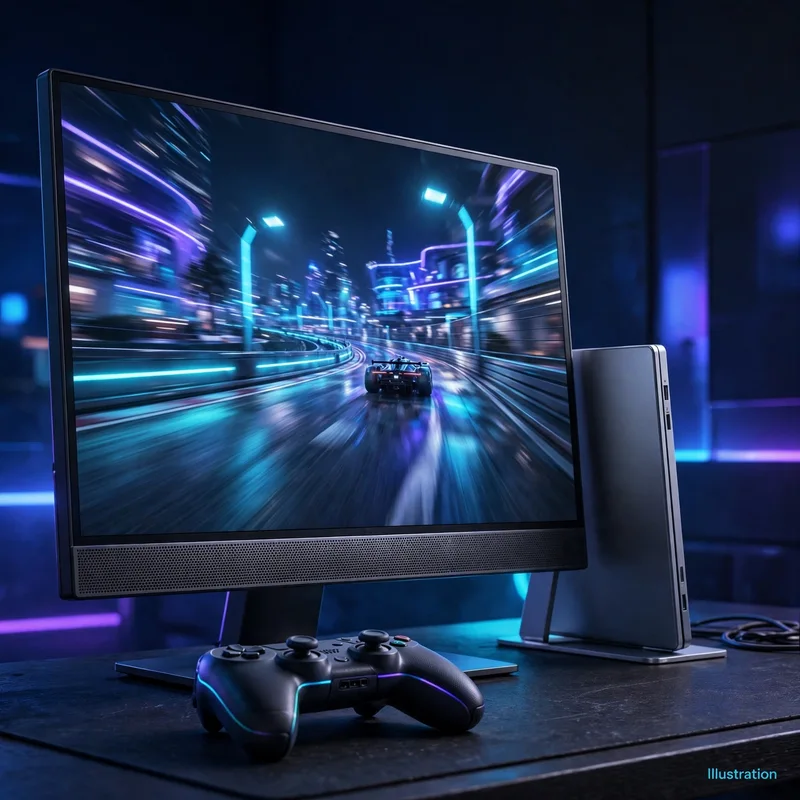
Best for 4K gaming with sound includedA 28-inch 4K panel at 144 Hz with HDMI 2.1, USB-C and KVM — and the loudest plain speaker pair here at 3 W a side. It is the pick if one screen must serve a PC, a console and a laptop. For more 4K options, see our best budget 4k 144hz gaming monitor guide.
- Speakers
- 3 W x 2
- Panel
- 28" SS IPS, 3840 x 2160
- Refresh rate
- 144 Hz
- Response time
- 1 ms GTG
- Inputs
- 2x HDMI 2.1, DP 1.4, USB-C
- Brand
- Gigabyte
Strengths
- 4K 144 Hz with HDMI 2.1
- USB-C and KVM
- 3 W speakers: loudest pair here
Trade-offs
- 300 nits: dimmest screen here
- No subwoofer
- 4K 144 Hz needs a strong GPU
Editorial opinion
Buy it for one screen serving a PC, a console and a laptop. For sound with no extra gear, buy the BenQ EX2710Q.
Price and availability change often — check the current listing.
Pick 3 · Best for PC + work
Gigabyte M27Q
Best for one screen for PC and laptopThe fastest panel here at 170 Hz, with KVM and USB-C for a laptop beside your PC. The trade-off is the sound: 2 W a side is the weakest speaker pair in this guide, so it suits a quiet room or a desk where headphones are close by.
- Speakers
- 2 W x 2
- Panel
- 27" SS IPS, 2560 x 1440
- Refresh rate
- 170 Hz
- Response time
- 0.5 ms MPRT
- Inputs
- 2x HDMI 2.0, DP 1.2, USB-C
- Brand
- Gigabyte
Strengths
- 170 Hz: fastest here
- KVM and USB-C
- 0.5 ms MPRT
Trade-offs
- 2 W speakers: weakest here
- DisplayPort 1.2 only
- No subwoofer
Editorial opinion
Buy it for speed and KVM on one screen. For better sound, buy the BenQ EX2710Q or the Dell.
Price and availability change often — check the current listing.
Pick 4 · Best value
Dell 27 Plus QHD S2725DSM
Best for a bright room and a tight deskTwo 3 W speakers — as loud as the best pair here — on a 1440p 144 Hz IPS panel with the best stand in this guide: height, tilt, pivot and swivel. The trade-off is connectivity: one HDMI port, no USB-C and no USB hub.
- Speakers
- 2 x 3 W
- Panel
- 27" IPS, 2560 x 1440
- Refresh rate
- 144 Hz
- Response time
- 1 ms MPRT
- Inputs
- HDMI 2.1, DP 1.4
- Brand
- Dell
Strengths
- 3 W speakers: loudest pair here
- Full ergo stand: height, tilt, pivot, swivel
- 1500:1 contrast, 350 nits
Trade-offs
- No USB-C or USB hub
- One HDMI port only
- No HDR support listed by Dell
Editorial opinion
Buy it for loud sound and a stand that adjusts every way. For USB-C and KVM, buy the Gigabyte M27Q.
Price and availability change often — check the current listing.
Pick 5 · Best 1080p / budget
BenQ MOBIUZ EX2710
Best for 1080p gaming on a budgetTwo 2.5 W treVolo speakers with a DSP and three sound modes — louder than the 2 W pair on the M27Q, and tuned for voices. A 1080p 144 Hz panel that also runs 1080p 120 Hz on consoles. For console screens, see our best gaming monitor for Xbox Series X and PS5 guide.
- Speakers
- 2 x 2.5 W treVolo, DSP
- Panel
- 27" IPS, 1920 x 1080
- Refresh rate
- 144 Hz
- Response time
- 1 ms MPRT / 2 ms GtG
- Inputs
- 2x HDMI 2.0, DP 1.2
- Brand
- BenQ
Strengths
- 2.5 W treVolo speakers with DSP
- 1080p 120 Hz on consoles
- 400 nits, HDRi
Trade-offs
- 1080p at 27 inches looks soft up close
- 2020 model — confirm the listing is new
- No USB-C
Editorial opinion
Buy it for the cheapest way into speakers you can actually use. For sharper 1440p sound, buy the BenQ EX2710Q.
Price and availability change often — check the current listing.
When built-in speakers are enough
Built-in speakers are enough when the room is small, the volume stays moderate and the game is not decided by footsteps. Story games, videos, work calls and casual play all sound fine on a 2 W or 3 W front-facing pair, and the EX2710Q’s subwoofer covers films and bass-heavy games too.
They are not enough when the room is big, the house is noisy, or you play competitive games where hearing a footstep first decides the round. Then headphones win — plug them into your PC or your controller and keep the monitor speakers for everything else.
Cheap alternatives that beat them
If the monitor speakers disappoint, three cheap fixes beat them all — and none of them needs a big budget. A compact soundbar sits under the screen, gives you real stereo separation and bass no 2 W driver can make, and costs less than a new monitor. The headphones you already own beat every monitor speaker here for competitive play and late-night sessions. And a pair of small desktop speakers is louder and clearer than any 2 W pair, if you have the desk space.
The catch is the same for all three: another box, another cable, another thing on the desk. That is exactly what this guide is for — if you want none of that, buy the EX2710Q and stop there. If you are willing to add one box, buy the cheapest good panel and spend the difference on a soundbar instead of on monitor speakers.
Key terms, explained
Monitor specs use terms that trip buyers up, and the same words mean different things on different boxes. These are the ones that matter for sound.
- Watts per channel
- How much power each speaker gets. Two watts per channel is the floor for clear desk sound; three watts is louder. Watts measure loudness, not quality.
- Subwoofer
- A separate bass speaker. Small monitor drivers cannot make bass, so a subwoofer — like the 5 W woofer in the EX2710Q — covers the low sounds.
- DSP
- Digital Signal Processor: a chip that tunes the sound. BenQ’s treVolo DSP adds sound modes that make voices clearer.
- Front-facing
- Speakers that point at you, from the front of the monitor. The best placement for clear sound at a desk.
- MPRT
- Moving Picture Response Time: how long a pixel stays visible. A 1 ms MPRT figure means less blur in fast motion.
- DisplayHDR 400
- VESA’s entry HDR certification. It needs a 400-nit peak, so highlights get brighter, but there is no local dimming.
Mistakes that cost gamers money
The most expensive mistake here is buying on the panel and finding out the speakers are unusable. These four are easy to avoid.
- Buying on wattage aloneA 3 W rear-facing speaker sounds worse than a 2 W front-facing one. Check placement first, watts second.
- Expecting bass from a flat panelNo 2 W or 3 W driver makes real bass. If bass matters, buy the pick with a subwoofer or add a soundbar.
- Buying a 2020 model without checking the listingThe EX2710 is a 2020 model and some retailers list it as discontinued. Confirm the Amazon listing is new stock before you buy — never buy a Used or Renewed monitor as your main screen.
- Judging speakers from the boxMakers rarely state speaker placement on the box. Check the wattage and the placement section above before you buy, not after.
Frequently asked questions
Can I use a gaming monitor with speakers instead of a soundbar?
Yes, for most desks. The BenQ EX2710Q with its subwoofer is the only pick here that comes close to a soundbar for films and bass-heavy games. The 3 W pairs on the Gigabyte M28U and the Dell are fine for games and videos in a small room. A soundbar still wins on bass and stereo width, so if films matter most, add one later.
How many watts do monitor speakers need?
Two watts per channel is the floor for clear sound at a normal desk volume in a quiet room. Three watts is clearly louder and suits a bigger room. A subwoofer matters more than extra watts, because bass is what small drivers cannot make — that is why the 2 W plus 5 W subwoofer system on the EX2710Q sounds fuller than any plain 3 W pair.
Do all five picks work with PS5 and Xbox?
Yes, at their own limits. The Gigabyte M28U runs 4K 120 Hz on consoles over HDMI 2.1. The BenQ EX2710Q, the Gigabyte M27Q and the Dell run 1440p 120 Hz. The BenQ EX2710 runs 1080p 120 Hz. All five work on PC at their full refresh rate over DisplayPort.
Why do most monitor speakers sound bad?
Three reasons: the drivers are tiny, so they cannot make bass; they usually point down at the desk or back at the wall, so the sound loses clarity before it reaches you; and the thin cabinet leaves no room for sound to build up. The picks in this guide are the exceptions — their makers state the wattage and point the drivers forward.
So which one should you buy?
Buy the BenQ MOBIUZ EX2710Q if you want sound with no extra gear — it is the only pick with a subwoofer. Buy the Gigabyte M28U if you want 4K and HDMI 2.1 as well.
| If you need | Best pick | Why | Link |
|---|---|---|---|
| Sound with no extra gear | BenQ MOBIUZ EX2710Q | 2.1ch treVolo, 5 W subwoofer | Amazon Paid link |
| 4K gaming | Gigabyte M28U | 4K 144 Hz, HDMI 2.1 | Amazon Paid link |
| One screen for PC and laptop | Gigabyte M27Q | 170 Hz, KVM, USB-C | Amazon Paid link |
| Best value | Dell 27 Plus QHD S2725DSM | 3 W speakers, full ergo stand | Amazon Paid link |
Still deciding? Answer a few questions in Help me choose and GameVexo will narrow it down.
Where to go next
- Best 27-Inch 1440p Gaming MonitorsIf 4K is more than your GPU can feed.
- Best Gaming Monitor for Xbox Series X & PS5 in 2026Five 4K 120 Hz monitors for consoles.
- Best Budget 4K 144Hz Gaming MonitorFive 4K 144 Hz picks that cost less.
Sources
- BenQ EX2710Q specification, checked
- Gigabyte M28U specification, checked
- Gigabyte M27Q (Rev. 1.0) specification, checked
- Dell 27 Plus QHD Monitor S2725DSM, checked
- BenQ EX2710 datasheet, checked
- BenQ EX2710 listing, checked
Explore

Article engagement
Comments (0)
No comments yet. Be the first to share what you think.
Sign in to join the conversation.