
Mechanical vs Membrane Keyboard: The Honest Answer
A mechanical keyboard fires at 2 mm and is rated up to 100 million presses per key, while a membrane board needs a full press and is rated up to 10 million.

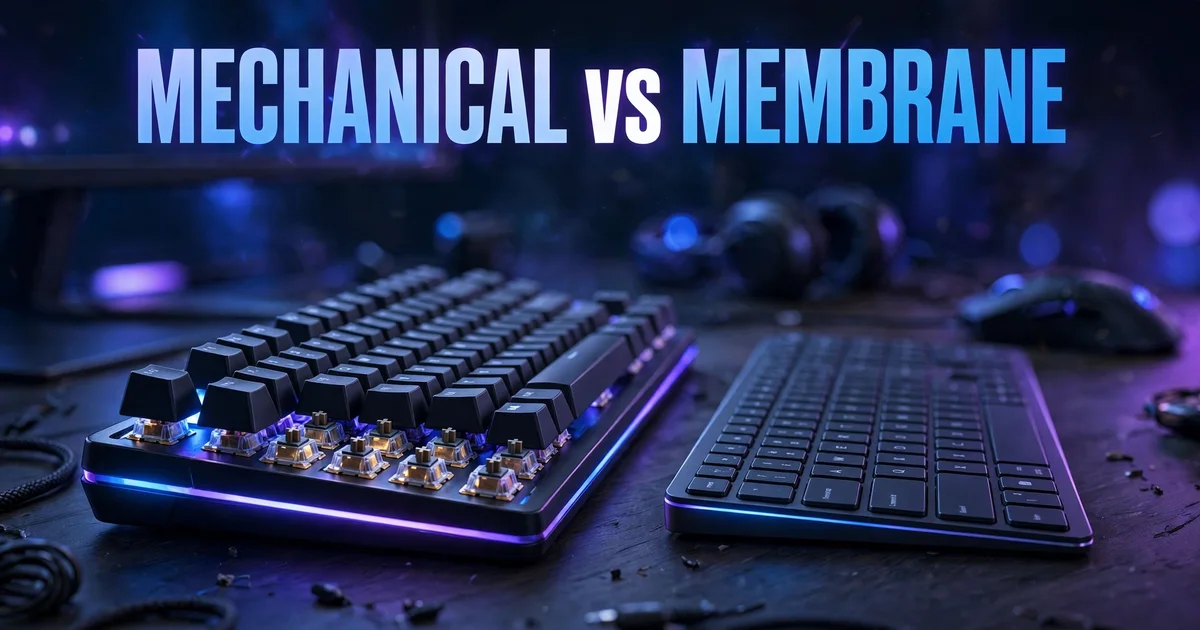
Your keyboard is the one part of your setup your fingers touch every second of a match, and the choice most players face is simple: a mechanical keyboard vs normal membrane board. A normal keyboard uses one rubber sheet under all its keys. A mechanical keyboard gives every key its own switch. That one difference changes how the keys feel, how long they last, and what happens when a key wears out.
Short answer
A mechanical keyboard vs normal membrane comes down to this: a mechanical switch fires at 2 mm and is rated up to 100 million presses per key, while a membrane key must bottom out near 4 mm and is rated up to 10 million. Mechanical wins on feel, life and repair; membrane wins on quiet and cost.
Who this guide is for
You play on PC and you are choosing between your current keyboard and your first mechanical board.
This is for you if
- You play fast games and press the same keys thousands of times.
- You type all day and your fingers ache by afternoon.
- Your current keyboard has a dead key or a mushy space bar.
Look elsewhere if
- You want a keyboard for a quiet office or shared room.
- You only need a spare for a second PC.
Check this before you buy
Check three things first: the switch type, the board size, and whether it works with your computer.
Three things to check
- Switch type first Linear: straight down, no bump. Tactile: a small bump. Clicky: a loud click.
- Board size and desk space Full-size is about 17 inches wide; tenkeyless drops the number pad, and 75% and 60% are smaller. See mechanical keyboard sizes: 60% vs 75% vs full size.
- Your computer and its ports Most gaming keyboards are wired USB and work on Windows, Mac and Linux. Mac users: check the layout — see the best mechanical keyboard for mac.
Building more than one piece? Plan the rest of your setup in the Setup Builder.
How this guide was researched
This guide compares the two types from the makers’ own pages.
How we researched this
- Cherry’s MX2A switch pages and its KW 3000 and KC 1000 membrane pages, checked Nov 2026.
- Razer’s optical switch page for its 100 million rating.
- Durability uses one maker’s figures on both sides, so the numbers compare directly.
- Specs come from manufacturer documentation. GameVexo does not physically test products — see how we research.
How each one works underneath
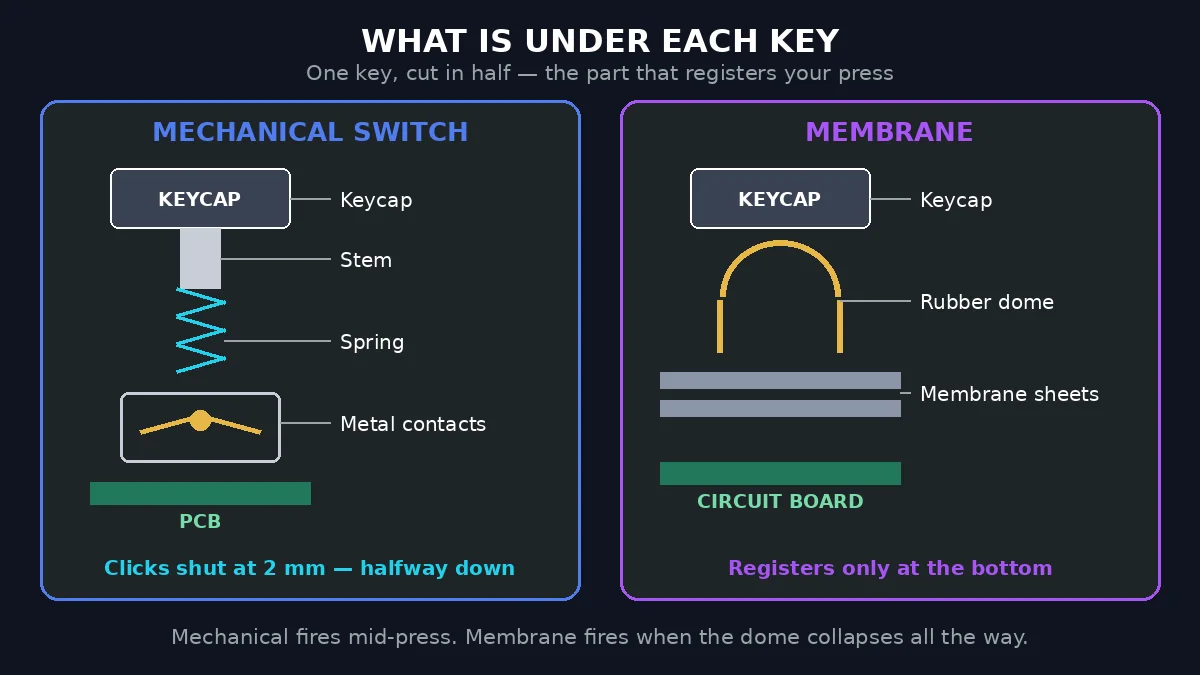
A mechanical keyboard puts one switch under every key. A membrane keyboard puts one rubber sheet under all of them.
Under a mechanical key sits a housing with a stem, a spring and two metal contacts. Press the key and the stem moves down. At about 2 mm the contacts close and the signal is sent. Release it and the spring pushes it back up.
Under a membrane key sits a rubber dome. Press the key and the dome collapses, pushing two thin sheets together until the circuit closes at the bottom. The dome pushes the key back up. There is no single switch to replace: one dome sheet serves the whole board.
Mechanical keyboard vs normal: does it make you faster?
A mechanical switch fires earlier in the press, but no published test shows it makes a player faster.
A Cherry MX2A Red switch fires at 2 mm of travel, while a membrane key needs a near-full press of about 4 mm. But the signal still travels the same USB path, and the switch’s own bounce time is under 1 ms. That gap is a fraction of a millisecond; your own reaction is measured in hundreds.
What a mechanical board does give you is the same feel on every key, every time. The actuation point does not move as the switch wears, so your fingers learn exactly where the key fires. That helps when you double-tap — but it is a feel advantage, not a speed advantage.
Durability: the real numbers
Cherry rates its MX2A switches up to 100 million presses per key, and its own membrane boards up to 10 million.
| What | Mechanical | Membrane |
|---|---|---|
| Rated presses per key | Up to 100 million per key | Up to 10 million per key |
| Where the key fires | 2 mm into a 4 mm press | At the bottom |
| Keys pressed at once | Full N-key rollover | Usually 2-key rollover |
| When one key wears out | Replace that one switch | Replace the whole board |
| Feel over years | Same feel for years | Domes soften with use |
| Noise | Louder, except silent | Quieter by design |
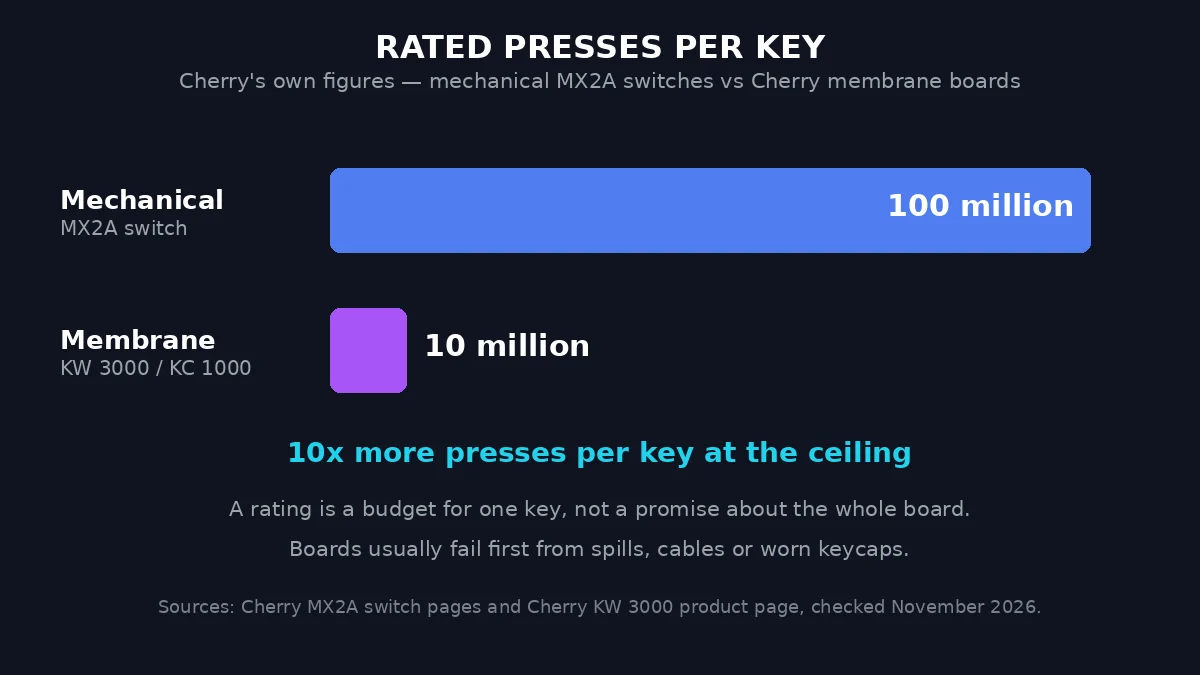
What do the numbers mean in years? Take your busiest key — usually space or W. At 10,000 presses a day, a 10 million rating lasts about 2.7 years, and a 100 million rating lasts about 27 years. A rating is a budget for one key.
Noise: which one is quieter?
A membrane keyboard is quieter than most mechanical boards.
Clicky switches, like Cherry MX Blue, click at 2.2 mm — the click is the point, and it carries through walls. Tactile switches, like MX Brown, give a bump with no click. Linear switches, like MX Red, press straight down with neither. Silent switches add dampening.
A membrane board has no click mechanism at all. If you play at night or share a room, pick a membrane board or a silent linear switch. No maker publishes a decibel figure for a keyboard.
Cost over five years
A mechanical board costs more on day one and less per year.
A membrane board is cheap to make: one rubber sheet, no individual switches. A mechanical board is expensive to make: one switch under every key. At 10,000 presses a day, a membrane board’s rating runs out in about 2.7 years — and one worn dome means replacing the whole board. A mechanical board’s switches are still inside their rating, and a dead switch is one part you swap in.
If you are shopping on a tight budget, budget mechanical boards exist — see the best budget gaming keyboards. Keycaps wear on both types, and a mechanical board lets you swap them.
Who should stay on membrane
Stay on membrane if your keyboard mostly needs to be quiet, cheap and out of the way.
A shared office or bedroom is the clearest case: nobody else wants to hear your switches. A second PC is another: used an hour a day, a membrane board lasts for years.
If you like the feel of the keyboard you already own, there is no rule that says you must switch. If it misses keys or feels mushy, change it.
What to check before you choose
Switch type decides the feel. Layout decides whether it fits your desk.
Switch type, first
Linear for smooth, fast presses. Tactile for a bump you can feel. Clicky for sound.
Layout and size
Full-size keeps the number pad. Tenkeyless drops it. 75% and 60% are smaller still.
Rollover
Holding W and strafing with A or D while jumping needs more than 2-key rollover.
Key terms, explained
These four terms trip buyers up more than any spec sheet.
- Actuation point
- The distance a key travels before it sends a signal. A Cherry MX2A Red actuates at 2.0 mm.
- Hot-swap
- The switches pull out without soldering, so one dead switch is a one-minute fix.
- N-key rollover
- The board registers every key you press at once. The opposite is ghosting.
- Debounce
- The tiny delay so one press does not register twice.
Mistakes that cost gamers money
Buying a clicky switch for a shared room is the most expensive mistake here.
- Buying clicky switches for a shared roomThe click carries through walls. Test the sound first.
- Judging a board by its switch rating aloneIt is for one switch. The cable, the USB port and the keycaps can fail first.
- Ignoring the layoutIt pushes the mouse to the edge. Measure first.
- Paying for hot-swap and never using itIt only saves money if you will swap a switch.
Frequently asked questions
Are mechanical keyboards better for gaming?
Yes, for most players, but not because they are faster. A mechanical switch fires at 2 mm and feels the same on every key, and most boards give full N-key rollover, so no press is missed. The real gain is consistency, durability and repair.
How long do mechanical keyboards last?
Cherry rates its MX2A switches up to 100 million presses per key. At 10,000 presses a day on your busiest key, that is about 27 years — far longer than the rest of the board usually survives. Cables, spills and worn keycaps end most boards first.
Is a membrane keyboard bad for gaming?
No, not at all. If it registers every key you press and feels fine, it plays fine for gaming. Its limits are real, though: most membrane boards top out at 2-key rollover, the domes soften with use, and one worn key means replacing the whole board.
What to do next
Get a mechanical board if you play or type for hours a day. Stay on membrane if quiet and cost matter more than feel.
Still deciding? Answer a few questions in Help me choose and GameVexo will narrow it down by your games, platform and budget.
Where to go next
- Best Budget Gaming KeyboardsWhat to check before you buy one.
- Mechanical Keyboard Sizes60% vs 75% vs full size.
- Best Mechanical Keyboard for MacLayout and compatibility for Mac users.
Sources
- Cherry MX2A switch pages, checked
- Cherry KW 3000: 10 million presses per key, checked
- Cherry KC 200 MX: N-key rollover, checked
- Razer optical switches, checked
Explore


Article engagement
Comments (0)
No comments yet. Be the first to share what you think.
Sign in to join the conversation.