

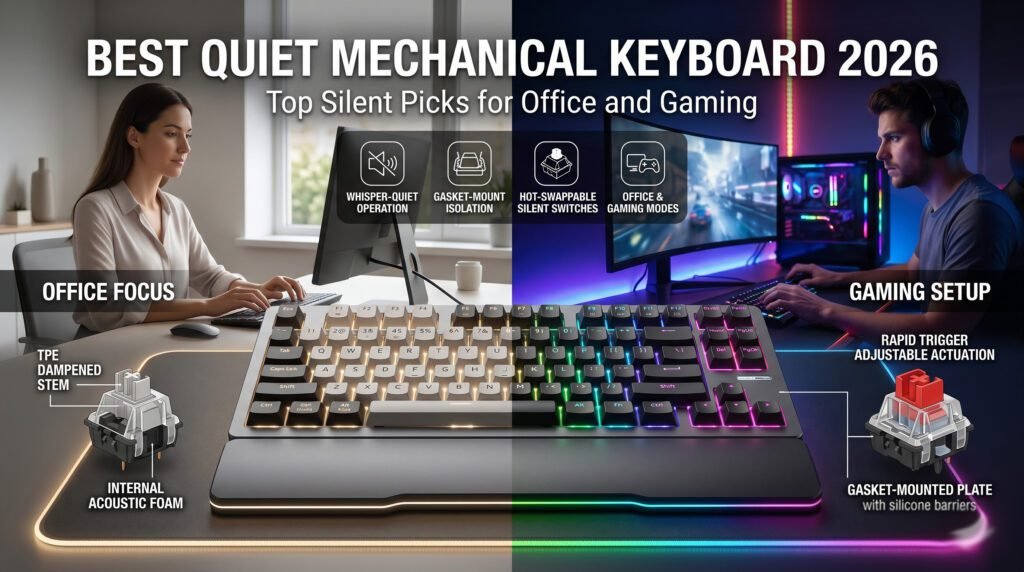
A quiet mechanical keyboard is not a silent one. Every mechanical keyboard makes some noise, so a truly noiseless mechanical keyboard does not exist. What you can buy is a board built to cut the loudest sounds: the key hitting bottom, the key snapping back up, and the hollow ring of the case.
This guide compares five keyboards by what their makers and retailers publish about noise control. We did not hear, test or record any of them. Only two of the five name a silent or quiet switch, and the other three come with a plain note on what they do and do not document.
Quick Answer
The clearest published noise control comes from the Razer BlackWidow V4 with Yellow switches (Razer calls the switch silent and lists PCB foam) and the Logitech MX Mechanical with Tactile Quiet switches. The RK68 and G915 TKL publish no silent-switch specification.
Find Your Best Pick — At a Glance
- Most Documented Silencing
Razer BlackWidow V4 (Yellow)
Yellow linear switch Razer calls silent, plus PCB foam.
View on Amazon Paid link - Quiet Switch for an Office
Logitech MX Mechanical
Tactile Quiet switch that Logitech says makes less noise.
View on Amazon Paid link - Dampened Case
Keychron K8 Pro
Foam, silicone pad and steel plate in the hot-swap version.
View on Amazon Paid link
Our Picks at a Glance
These five are ordered by how much noise control each documents, not by how quiet they sound.
| Product | Layout | Noise feature published | Best For | Link |
|---|---|---|---|---|
| Razer BlackWidow V4 (Yellow) | Full-size | Yellow linear switch described as silent; PCB foam | Shared rooms | Amazon Paid link |
| Logitech MX Mechanical | Full-size (Mini sold separately) | Tactile Quiet switch option | Offices | Amazon Paid link |
| Keychron K8 Pro | Tenkeyless | Foam, silicone pad, steel plate (hot-swap version) | Foam-lined case | Amazon Paid link |
| RK Royal Kludge RK68 | 65%, 68 keys | “Quiet” switch label; no method listed | Compact desks | Amazon Paid link |
| Logitech G915 TKL | Tenkeyless, low-profile | None listed | Low-profile fans | Amazon Paid link |
What Actually Makes a Keyboard Loud
Most mechanical keyboard noise comes from a few places. Each one is something a maker must fix to build a quiet mechanical keyboard.
- Bottoming out. The key stem hits the plate or case at the end of a press.
- Returning. The key springs back and taps the top of the switch housing.
- Clicky parts. Clicky switches add a click on purpose. Logitech calls the G915 TKL clicky option “audible and tactile.”
- The case. A hollow case can ring. Foam is the usual fix.
- Stabilizers. Long keys such as the spacebar can rattle.
Shoppers search for a silent, quiet or noiseless mechanical keyboard, but makers use those words loosely. Razer says “silent,” and Logitech and RK say “quiet.” None of the five gives a decibel figure in the pages we read.
Quick Tip: Typing gently avoids slamming keys to the bottom. This is general advice, not something we measured.
Silent Switches, Dampeners and Case Foam
These are the features that reduce noise.
Silent or quiet switches
Silent switches add soft pieces, called dampeners, that cushion the key at the bottom and sometimes the top of its travel. Two boards here name one: the V4 (Razer Yellow) and the MX Mechanical (Tactile Quiet).
Case and PCB foam
Foam inside the case soaks up echo. Razer lists PCB foam on the V4 line, and Keychron lists foam plus a silicone pad in the K8 Pro hot-swap version.
Plate and case material
Metal parts make a board stiff and heavy. Makers rarely say how that changes the sound, so treat it as a clue, not a promise. Keychron lists a steel plate; Logitech and Razer list aluminum top cases.
Mount style
A gasket mount floats the plate on soft strips. None of the five documents one. Keychron lists a tray mount for the K8 Pro.

The Five Picks
Card pictures are labeled illustrations of a generic layout, not product photos.

Pick 1 — Most Documented Silencing
Razer BlackWidow V4 (Yellow)
Shared rooms where a silent switch mattersYellow linear switch Razer calls silent, plus PCB foam
- Brand
- Razer
- Switch
- Yellow (linear)
- Noise feature
- Described as silent
- Foam
- PCB foam listed
- Case
- Varies by version
- Connection
- Wired (Pro and X listings)
Pros
- Switch described as silent by Razer
- PCB foam listed
- Linear switch has no click or bump
Cons
- Versions differ, so it is easy to buy the wrong one
- “Silent” is Razer’s word, not a measurement
Our Editorial Opinion
For readers who want the strongest documented silencing. Treat “silent” as the maker’s claim.
Razer’s product text lists Yellow linear switches with a key feel of “linear and silent,” and retailer copies mention sound dampeners. The specification also lists PCB foam. That is the clearest noise-control description of the five. The catch is the model family: V4, V4 Pro and V4 X differ in foam and case material, so confirm your exact version on Amazon.
Price changes frequently — check Amazon for the latest deal.

Pick 2 — Quiet Switch for an Office
Logitech MX Mechanical
Office desks and multi-device setupsTactile Quiet switch, low-profile, Bluetooth or Logi Bolt
- Brand
- Logitech
- Switch
- Tactile Quiet (Linear, Clicky also sold)
- Layout
- Full-size
- Connection
- Bluetooth or Logi Bolt
- Case
- Aluminum top case listed
- Foam
- Not documented
Pros
- Quiet-named switch option
- Pairs with up to three devices
- Low-profile keys
Cons
- Foam and mount not documented
- Easy to pick the Linear or Clicky version by mistake
Our Editorial Opinion
A sensible office start if you want a tactile bump with less sound. Confirm the Tactile Quiet switch before you buy.
Logitech sells the MX Mechanical with Tactile Quiet, Linear and Clicky switches. It says Tactile Quiet gives a tactile bump and “less noise” so your typing does not disturb people nearby. Only the Tactile Quiet version fits that claim, so check your Amazon listing. A smaller Mini also exists. We found no foam or mount details.
Price changes frequently — check Amazon for the latest deal.

Pick 3 — Dampened Case
Keychron K8 Pro
Typists who want a foam-lined, hot-swap boardFoam, silicone pad and steel plate; standard switches
- Brand
- Keychron
- Layout
- Tenkeyless
- Switch
- Gateron G Pro or K Pro options
- Foam
- Foam + silicone pad (hot-swap)
- Plate
- Steel (hot-swap)
- Mount
- Tray
Pros
- Foam, silicone pad and steel plate listed
- Hot-swappable switches
- QMK and VIA support
Cons
- No silent switch in the standard options
- Tray mount, not a gasket mount
Our Editorial Opinion
Choose it for a heavy, padded case. Do not expect silent-switch quiet out of the box.
Keychron says the hot-swap version uses foam, a silicone dampening bottom pad and a steel plate for “a peaceful typing sound.” It is the most detailed case-dampening list of the five. The switches are the weak spot: the page lists standard options such as Gateron G Pro, and we found no silent switch. You can swap switches yourself, but we have not checked which silent ones fit.
Price changes frequently — check Amazon for the latest deal.

Pick 4 — Compact 65% Layout
RK Royal Kludge RK68
Small desks that need a compact board65% layout, 68 keys, wireless, hot-swappable; “Quiet” label
- Brand
- RK Royal Kludge
- Layout
- 65%, 68 keys
- Switch
- “Quiet” option (label)
- Connection
- Bluetooth 5.0 (listing)
- Hot-swap
- Yes (listing)
- Dampening
- Not documented
Pros
- Compact 65% layout with arrow keys
- Hot-swappable per the listing
- A “Quiet” switch option exists
Cons
- No documented dampening method
- No function row on a 65% layout
Our Editorial Opinion
For readers who want the layout first. Not a first choice for a sleeping room until RK explains “Quiet.”
RK sells the RK68 as a compact 65% keyboard. Listings describe Bluetooth 5.0, hot-swappable switches and pairing with three devices, and some titles name a “Quiet Red” switch. We found no explanation of how that switch is dampened and no foam, plate or mount details. Treat “Quiet” as a label until RK explains it, and check which switch your listing names.
Price changes frequently — check Amazon for the latest deal.

Pick 5 — Low-Profile TKL
Logitech G915 TKL
Low-profile fans who value layout over silenceLow-profile wireless TKL; no silent switch listed
- Brand
- Logitech
- Layout
- Tenkeyless
- Switches
- GL Tactile, Linear, Clicky
- Profile
- Low-profile
- Noise feature
- None documented
- Foam / mount
- Not documented
Pros
- GL Linear option has no click or bump
- Low-profile keys with shorter travel
- Compact tenkeyless layout
Cons
- No silent switch listed
- Foam, plate and mount not documented
Our Editorial Opinion
Pick it for the layout, not for noise control. For a shared room, choose one of the first three.
Logitech sells the G915 TKL with GL Tactile, Linear and Clicky switches. None is described as silent, and Logitech calls the clicky version “audible and tactile.” Low-profile keys travel less than standard keys, but we found no published noise claim. It earns its place only for readers who already want this board.
Price changes frequently — check Amazon for the latest deal.

Best for an Office
In an office, the risk is a click that carries across desks. The MX Mechanical with Tactile Quiet switches is the clearest match here: Logitech says it makes less noise, and three-device pairing helps if you move between a laptop and a desktop. The BlackWidow V4 (Yellow) is the other option if you have room for a full-size wired board.
Avoid
Clicky switches on any board. Logitech calls the G915 TKL clicky option audible.
Best for a Shared Bedroom
When someone is asleep nearby, the best documented combination is a silent switch plus a padded case. The BlackWidow V4 (Yellow) lists both, so it comes first. The K8 Pro lists strong case dampening but standard switches, so expect more key sound. The RK68 and G915 TKL document no silent switch. These notes come from specifications, not listening. Room, desk and typing force all change what you hear.
Keep in mind
A desk mat can soften desk noise on any board. We did not test this with these keyboards.
What Silence Costs You in Feel
Silent switches pad the key stop, so the landing feels softer. That is the point, and also the cost.
| Option | What you gain | What you give up |
|---|---|---|
| Silent linear (V4 Yellow) | Smooth press, less sound | No tactile bump |
| Tactile quiet (MX Mechanical) | A bump with less sound | Softer, more muted landing |
| Foam-dampened standard switch (K8 Pro) | Padded case, switch you may swap | Key sound stays louder |
| Low-profile keys (G915 TKL, MX Mechanical) | Shorter travel | Different feel from standard keys |
⚠️ Important: We did not type on any of these boards. This table shows trade-offs, not how a keyboard feels.
How GameVexo Chose These Picks
How GameVexo chose these picks
Evidence basis: Manufacturer specifications and retailer copies of manufacturer text. GameVexo did not test, own, record or measure any of these keyboards.
What came from documentation: Switch names, layouts, foam, plate, case, mount and connection details come from the sources below, checked in October 2026.
Independent evidence: None cited. For decibel figures, look for a reviewer who recorded the keyboard and published the method.
How picks are chosen: The editor chose the five models. They are ordered by how much noise control each documents: switch, foam, plate and case, then mount. Price, ratings and sales rank played no part.
Sources: Keychron K8 Pro product page; Razer BlackWidow V4 Pro page plus retailer copies of Razer text; RK Gaming Store RK68 page; Logitech product text for the MX Mechanical and G915 TKL, read on Logitech and retailer pages.
Frequently Asked Questions
Is there a truly silent or noiseless mechanical keyboard?
No. “Silent” and “quiet” describe switches and cases built to reduce noise, but every key press still makes some sound. We found no decibel figure for these five boards.
Are silent switches worth it?
They are worth it if other people can hear you, at the cost of a softer feel. Here, the V4 (Yellow) and the MX Mechanical (Tactile Quiet) name a silent or quiet switch.
Can I make a regular mechanical keyboard quieter?
Hot-swappable boards such as the K8 Pro let you change switches, and foam or a desk mat can help. We did not test any modification or check which switches fit.
Will the G915 TKL or RK68 work in a quiet room?
Neither documents a silent switch. Logitech calls the G915 TKL clicky switch audible, and RK does not explain its “Quiet” label. Pick one for the layout, and check the switch your listing names.
Final Verdict — Which Should You Buy?
For silence, start with the BlackWidow V4 (Yellow) or the MX Mechanical (Tactile Quiet). Choose the others for layout or case.
| If You Need… | Best Pick | Key Feature | Buy |
|---|---|---|---|
| Strongest documented silencing | Razer BlackWidow V4 (Yellow) | Silent-described switch, PCB foam | Amazon Paid link |
| A quiet switch for an office | Logitech MX Mechanical | Tactile Quiet switch | Amazon Paid link |
| A foam-lined case | Keychron K8 Pro | Foam, silicone pad, steel plate | Amazon Paid link |
| A compact 65% layout | RK Royal Kludge RK68 | “Quiet” switch label | Amazon Paid link |
| A low-profile tenkeyless | Logitech G915 TKL | No silent switch listed | Amazon Paid link |
Tell us in the comments which one you picked. 👇
A note on what I could not verify: I did not hear, test or record any of these keyboards, and I found no published decibel figures. Foam, plate and mount details are missing for the MX Mechanical, RK68 and G915 TKL, which does not mean the features are absent. No board documents a gasket mount. Each name covers more than one version, so the model and switch behind your Amazon listing may differ from what is described here. Prices, stock and ratings change, so none are shown. Please confirm the model on Amazon before you buy.
Explore



Article engagement
Comments (0)
No comments yet. Be the first to share what you think.
Sign in to join the conversation.