

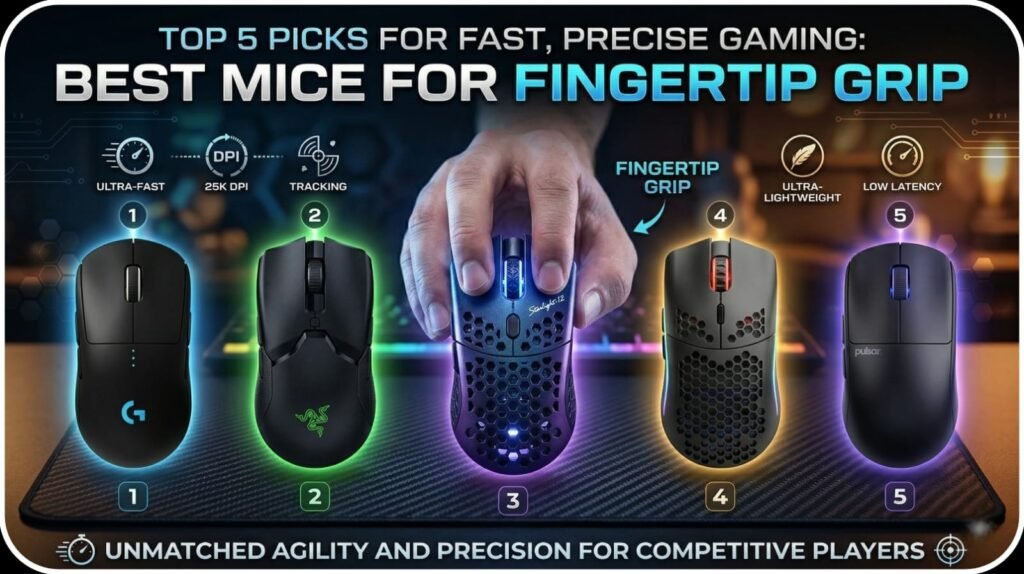
If only your fingertips touch the mouse, the shell has to stay out of your way. A mouse that is too long pushes into your palm. One that is too wide forces your thumb and ring finger apart. A bigger number on the sensor spec fixes neither problem.
This guide compares five fingertip grip mouse picks by the numbers that decide fit: published length, width, height and weight. We line those numbers up against simple hand-size bands, so you can see which shells suit small, medium and large hands before you buy. GameVexo did not handle these mice. Every measurement below comes from a manufacturer or an independent reviewer, and each source is named.
Quick Answer
For most medium and large hands, the Razer Viper V3 Pro is the best fingertip grip mouse here: Razer lists it at 54 g and says its shape suits claw and fingertip grip. If your hand measures under 17 cm (6.7 in) from fingertip to wrist crease, start with the Logitech G305, the shortest and narrowest pick at 116.6 mm long and 62.15 mm wide.
Our Picks at a Glance
- Best Overall
Razer Viper V3 Pro
A 54 g wireless shell that Razer pitches for claw and fingertip grip, with grip tape and an 8,000 Hz dongle in the box.
View on Amazon Paid link - Best Lightweight Pick
HyperX Pulsefire Haste 2 (Wired)
The lowest listed weight here at 52 g (black, without cable), plus four pieces of grip tape.
View on Amazon Paid link - Best for Small Hands
Logitech G305 LIGHTSPEED
The shortest and narrowest shell in this guide at 116.6 × 62.15 mm.
View on Amazon Paid link
What Fingertip Grip Actually Is
Fingertip grip means only the tips of your fingers and thumb touch the mouse. Your palm hovers above it or rests on the desk behind it. Your index and middle fingers sit on the main buttons, while your thumb and ring finger (sometimes your pinky too) hold the sides. ZOWIE describes it as the grip with the least hand contact of the three common styles.
With no palm on the shell, your fingers do the lifting and the small aim corrections. That is why shape matters so much here. The mouse must be short enough that your palm never bumps the back, and narrow enough that your thumb and ring finger can pinch it without strain. Corsair’s grip guide points the same way: shorter bodies, lower profiles, lighter weight, and no hump that pushes into your palm.
Quick Tip: Not sure which grip you use? Hold your mouse the way you normally play and freeze. If only your fingertips touch it, you use fingertip grip. If the base of your palm touches the back of the shell, it’s claw grip.
| Grip style | What touches the mouse | Shape that usually helps | Note |
|---|---|---|---|
| Palm grip | Whole palm and fingers | Larger shell with a higher back for support | Comfort first |
| Claw grip | Back of the palm plus arched fingertips | Medium length with a rear hump | Speed with some support |
| Fingertip grip | Fingertips and thumb only | Short, low and light, with nothing in the palm’s way | ⭐ This guide |
Height and Width, Measured
Here is the core idea of this page: a fingertip grip mouse fails on shape, not on specs. A 35,000 DPI sensor cannot make a long shell shorter. So we collected the published length, width and height of all five picks and compared them with hand size. To be clear about the word “measured”: these are the manufacturers’ published measurements (and, for one mouse, an independent reviewer’s). GameVexo did not put a ruler on these mice.
Step 1: measure your hand. ZOWIE measures hand length from the tip of your middle finger to the first crease on your wrist. In its small-hands guide, under 17 cm (6.7 in) generally counts as small. In its large-hands guide, over 19 cm (7.5 in) counts as large. That leaves 17–19 cm as the medium band.
Step 2: compare length and width first. Across our five picks, height barely changes. The lowest shells are 38.2 mm tall and the tallest is 39.9 mm, a gap of just 1.7 mm. Length spreads much further, from 116.6 mm to 127.1 mm, a 10.5 mm difference. Width runs from 62.15 mm to 66.8 mm. ZOWIE also notes that hump height matters less for fingertip users, while a slimmer width matters for small hands. So for these five mice, length and width are where the real differences are.
⚠️ Important: Brands don’t label their axes the same way. Logitech’s G305 spec page lists the 116.6 mm front-to-back length as “Height” and the 38.2 mm height as “Depth.” Always check which number runs front to back before you compare two spec sheets.
Small Hands (under 17 cm / 6.7 in)
Start with the shortest, narrowest shell: the Logitech G305 at 116.6 × 62.15 mm. The Endgame Gear XM1r is about 5.5 mm longer and 3.7 mm wider, so it’s a second choice. The two Viper V3 models are the longest picks here, and their rear may reach a small palm.
Medium Hands (17–19 cm / 6.7–7.5 in)
All five picks are reasonable starting points. Choose the Viper V3 Pro if you want the lightest wireless option. If you prefer a cable, the XM1r (122.14 mm) is shorter than the Haste 2 (124.3 mm).
Large Hands (over 19 cm / 7.5 in)
Longer shells give your fingers more to hold. The Viper V3 Pro and Viper V3 HyperSpeed share the longest shell in this guide at 127.1 mm. The Haste 2 is the widest at 66.8 mm, which gives your thumb and ring finger more surface to pinch.

Quick Comparison Table
| Product | Published Weight | Connection | Best For | Link |
|---|---|---|---|---|
| Razer Viper V3 Pro Best Overall | 54 g | Wireless (8K dongle included) + wired | Medium and large hands | Amazon Paid link |
| HyperX Pulsefire Haste 2 (Wired) Lightest | 52 g (black, no cable) | Wired | Lowest weight | Amazon Paid link |
| Logitech G305 LIGHTSPEED Small Hands | 99 g (with AA) | Wireless | Small hands | Amazon Paid link |
| Endgame Gear XM1r | About 70 g | Wired | Mid-size, wired | Amazon Paid link |
| Razer Viper V3 HyperSpeed | 82 g (with AA) | Wireless (AA battery) | Long battery life | Amazon Paid link |
How GameVexo Chose
How GameVexo chose these picks
Evidence basis: This is a research-based guide. GameVexo did not hold, weigh, measure or play with these mice. Every number comes from the sources named below.
What came from documentation: Dimensions, weights, sensors, polling rates, battery ratings and box contents come from Razer, HyperX and Logitech spec pages and press materials. ZOWIE’s knowledge pages supplied the hand-measuring method and the size bands.
Independent evidence: We could not reach Endgame Gear’s own XM1r spec page, so its dimensions come from the spec tables in TechPowerUp’s and KitGuru’s reviews, which agree. Tom’s Hardware’s reviews supplied the box contents for both Razer mice. These are third-party figures, not GameVexo measurements.
How picks are chosen: We ranked by shape fit first (length, width and height against the hand-size bands), then weight, then whether the maker positions the shape for fingertip or claw grip, whether grip tape is included, and connection and battery. The five mice are the same ones this page covered before; we re-checked each one, reordered them by fingertip fit, and removed claims we could not support.

The Five Picks

#1 — Best Overall
Razer Viper V3 Pro
Medium-to-large hands that want a light wireless mouse54 g · 127.1 × 63.9 × 39.9 mm · wireless with an 8,000 Hz dongle in the box
- Brand
- Razer
- Polling
- Up to 8,000 Hz wireless (dongle included)
- Weight
- 54 g (black), 55 g (white)
- Connection
- HyperSpeed wireless + USB-C wired
- Sensor
- Focus Pro 35K Gen-2, up to 35,000 DPI
- Battery
- Up to 95 h at 1,000 Hz
- Size
- 127.1 × 63.9 × 39.9 mm
Pros
- Lightest wireless pick here at 54 g
- Razer says the shape suits claw and fingertip grip
- 8,000 Hz dongle and grip tape included
- Optical switches rated for 90 million clicks
Cons
- Longest and tallest shell here, so small hands may find it long
- Rated battery drops to 17 hours at 8,000 Hz
- Side buttons on the left only (right-handed shape)
- Highest launch list price of the five
Our Editorial Opinion
Pick the Viper V3 Pro if your hand is about 17 cm or longer and you want the lightest wireless fingertip option here. If your hand is smaller, the G305 lines up with the numbers better.
The Viper V3 Pro is the lightest wireless mouse in this guide. Razer lists it at 54 g without the cable and dongle, and Tom’s Hardware notes the white version is 55 g. Razer’s own FAQ says its right-handed symmetrical shape is best suited to claw and fingertip grip. The box includes Razer’s HyperPolling dongle for up to 8,000 Hz wireless polling and pre-cut grip tape, according to Tom’s Hardware’s review.
The trade-off is size. At 127.1 mm long and 39.9 mm tall, it shares the longest and tallest shell in this guide. That suits medium and large hands but may reach the palm of a small hand. Battery life also falls as polling rises: Razer rates it at up to 95 hours at 1,000 Hz and up to 17 hours at 8,000 Hz.
🔗 Pairs well with: our best ambidextrous gaming mouse picks if you play left-handed, since this shape has left-side buttons only
Price changes frequently — check Amazon for the latest deal.

#2 — Best Lightweight Pick
HyperX Pulsefire Haste 2 (Wired)
Players who want the lowest weight and don’t mind a cable52 g (black, no cable) · 124.3 × 66.8 × 38.2 mm · up to 8,000 Hz
- Brand
- HyperX
- Polling
- 1,000 Hz default, up to 8,000 Hz
- Weight
- 52 g black / 53 g white (no cable)
- Connection
- Wired USB-A, 1.8 m HyperFlex 2 cable
- Sensor
- HyperX 26K, up to 26,000 DPI
- Switches
- Rated for 100 million clicks
- Size
- 124.3 × 66.8 × 38.2 mm
Pros
- Lowest listed weight in this guide
- Four pieces of grip tape in the box
- 8,000 Hz polling option
- Low-friction PTFE skates
Cons
- Widest shell here at 66.8 mm
- Wired only in this version
- 8,000 Hz must be switched on (default is 1,000 Hz)
Our Editorial Opinion
This is the pick when weight matters most and a cable doesn’t bother you. If your hand is under 17 cm, check the width first: the G305 is 4.65 mm narrower.
HyperX lists the wired Haste 2 at 52 g in black and 53 g in white, measured without the cable. That makes it the lightest mouse here on paper, just ahead of the Viper V3 Pro. It also ships with four pieces of HyperX grip tape for both main buttons and both sides. Polling runs at 1,000 Hz by default; HyperX says you can switch to 8,000 Hz with an onboard button combo or its NGENUITY software.
For fingertip grip, its catch is width. At 66.8 mm, it is the widest shell in this guide, so small hands have to spread the thumb and ring finger further. It is also wired. HyperX lists 75 g with the cable included, and while the cable doesn’t sit on your fingers, it can still pull on the mouse as you move.
🔗 Pairs well with: our best honeycomb gaming mouse picks if you want to compare other ways brands cut weight
Price changes frequently — check Amazon for the latest deal.

#3 — Best for Small Hands
Logitech G305 LIGHTSPEED
Small hands, or anyone who wants the shortest shell116.6 × 62.15 × 38.2 mm · 99 g with AA battery · LIGHTSPEED wireless
- Brand
- Logitech
- Report rate
- 1 ms (1,000 Hz)
- Weight
- 99 g with AA, 75 g without
- Connection
- LIGHTSPEED 2.4 GHz wireless
- Sensor
- HERO, 200–12,000 DPI
- Battery
- About 250 h on one AA
- Size
- 116.6 × 62.15 × 38.2 mm
Pros
- Shortest and narrowest pick in this guide
- Long AA battery rating
- Built-in storage for the USB receiver
- Works with Windows, macOS and ChromeOS per Logitech
Cons
- Heaviest pick here at 99 g with the battery
- No grip tape in the box
- Lower sensor and polling ceilings than the others
Our Editorial Opinion
If your hand measures under 17 cm, start here. Size is the hardest thing to fix later; weight is the compromise you accept for it.
The G305 is the shortest and narrowest mouse in this guide. Logitech’s support page lists it at 116.6 mm long and 62.15 mm wide, which is 10.5 mm shorter than the two Viper V3 shells. For a small hand using fingertip grip, that extra room behind the mouse is the whole point.
Weight is the trade-off. Logitech lists 99 g with one AA battery and 75 g without it, so it is the heaviest pick here, and in fingertip grip your fingers do all the lifting. Its HERO sensor tops out at 12,000 DPI with a 1 ms (1,000 Hz) report rate, lower ceilings than the other four. Logitech rates the AA battery for about 250 hours of gaming, and the mouse stores its USB receiver inside.
🔗 Pairs well with: our best aesthetic gaming mouse picks if you also care about color and lighting
Price changes frequently — check Amazon for the latest deal.

#4 — Best Mid-Size Wired Pick
Endgame Gear XM1r
Medium hands that want a wired mouse shorter than the Haste 2About 70 g · 122.14 × 65.81 × 38.26 mm · wired
- Brand
- Endgame Gear
- Polling
- 125 / 500 / 1,000 Hz
- Weight
- About 70 g
- Connection
- Wired, braided cable (1.8 m per TechPowerUp)
- Sensor
- PixArt PAW3370, up to 19,000 CPI
- Switches
- Kailh GM 8.0, rated 80 million clicks
- Size
- 122.14 × 65.81 × 38.26 mm
Pros
- Shorter than the Haste 2 and both Vipers
- Pre-sorted main switches for consistent click force
- Two sizes of mouse feet included
- Lighter than the G305 and V3 HyperSpeed
Cons
- Polling tops out at 1,000 Hz
- Fairly wide at 65.81 mm for small hands
- Older model; newer XM2 mice exist
Our Editorial Opinion
A sensible wired middle ground if the G305 feels too small and the Haste 2 too long. If you need 8,000 Hz, look at the Haste 2 instead.
The XM1r sits between the G305 and the longer picks. The spec tables in TechPowerUp’s review and KitGuru’s review list it at 122.14 mm long, 65.81 mm wide and 38.26 mm tall, at about 70 g. Its main buttons use Kailh GM 8.0 switches that Endgame Gear pre-sorts to a 55–60 gf operating force, and the box includes a second, larger set of mouse feet, according to TechPowerUp.
There are two limits. Polling stops at 1,000 Hz, and the XM1r is an older design that Endgame Gear has followed with newer XM2-series mice. Check that the Amazon listing is the current XM1r before you buy.
🔗 Pairs well with: our best honeycomb gaming mouse picks for more light wired and wireless options
Price changes frequently — check Amazon for the latest deal.

#5 — Best Battery Life
Razer Viper V3 HyperSpeed
Players who want the V3 shape and rarely want to swap batteriesSame 127.1 × 63.9 × 39.9 mm shell as the V3 Pro · 82 g with AA · up to 280 hours
- Brand
- Razer
- Polling
- 1,000 Hz (4,000 Hz with optional dongle)
- Weight
- 82 g with AA battery
- Connection
- HyperSpeed 2.4 GHz wireless
- Sensor
- Focus Pro 30K
- Battery
- Up to 280 h at 1,000 Hz
- Size
- 127.1 × 63.9 × 39.9 mm
Pros
- Longest rated battery life in this guide
- Same shape as the Viper V3 Pro
- Launched at a much lower list price than the V3 Pro
Cons
- 82 g is heavy for fingertip grip
- No grip tape in the box
- Higher polling needs a separate dongle
Our Editorial Opinion
Choose this over the V3 Pro only if battery life and price matter more to you than weight. For fingertip grip alone, the lighter V3 Pro is the better fit.
Razer built the Viper V3 Pro on the shape it first introduced with this mouse, and the two share the same published dimensions. The difference is power. Razer rates the HyperSpeed for up to 280 hours on one AA battery at 1,000 Hz, or 75 hours at 4,000 Hz with its separately sold HyperPolling dongle. With the battery inside, Razer lists 82 g. TechPowerUp weighed its review unit at about 80 g with the battery and 57 g without.
For fingertip grip, that extra weight is the main drawback: it is 28 g heavier than the V3 Pro, and your fingers lift all of it. Tom’s Hardware’s review lists only the wireless dongle and an AA battery in the box, so there is no grip tape. It did launch at less than half the V3 Pro’s list price.
🔗 Pairs well with: our best ambidextrous gaming mouse picks if you need a mouse with buttons on both sides
Price changes frequently — check Amazon for the latest deal.
Best Small Fingertip Mouse
Our pick: the Logitech G305. The reason is geometry. It is 5.5 mm shorter than the XM1r, 7.7 mm shorter than the Haste 2, and 10.5 mm shorter than both Vipers. It is also the narrowest at 62.15 mm, and ZOWIE’s small-hands guidance puts a slimmer width first for fingertip grip.
The cost is weight. At 99 g with its AA battery, it’s almost twice as heavy as the Haste 2 or Viper V3 Pro. If that worries you, the next-shortest pick is the XM1r at about 70 g. Keep in mind it is 3.7 mm wider.
None of these five is a true “mini” mouse. If your hand is well under 17 cm and 116.6 mm still sounds long, a dedicated mini-size mouse may suit you better than anything in this list.
Best Lightweight Pick
Our pick: the HyperX Pulsefire Haste 2 (Wired), listed at 52 g in black. In fingertip grip, your fingertips lift and reposition the whole mouse with no palm underneath to help, so every gram counts more than it would with palm grip. If you want wireless, the Viper V3 Pro is only 2 g heavier on paper and drops the cable.
One caution: brands don’t weigh mice the same way. HyperX’s figure leaves out the cable. Razer’s leaves out the cable and dongle. Logitech’s 99 g includes the AA battery.
| Pick | Published weight | What the figure includes | Note |
|---|---|---|---|
| HyperX Haste 2 (Wired) | 52 g (black) | Mouse only, no cable (75 g with cable) | ⭐ Lightest |
| Razer Viper V3 Pro | 54 g (black) | Mouse only, no cable or dongle | Lightest wireless |
| Endgame Gear XM1r | About 70 g | Per review spec tables | Mid-weight |
| Razer Viper V3 HyperSpeed | 82 g | Includes the AA battery | Heavier |
| Logitech G305 | 99 g | Includes the AA battery (75 g without) | Heaviest |
Grip Tape and Why It Helps Here
With fingertip grip, you hold the mouse at a few small contact points instead of with your whole hand. Less contact means you depend more on friction at your fingertips to lift and steer it, especially when your hands get warm. Grip tape adds texture right where those fingertips land.
Which Picks Include Tape
Two do. Razer packs pre-cut grip tape with the Viper V3 Pro, and HyperX includes four pieces with the Haste 2. Logitech’s box list for the G305 shows only the mouse, receiver and documentation, and Tom’s Hardware lists no tape with the V3 HyperSpeed. We didn’t find tape in the XM1r box contents we checked.
Where to Put It
Start with the sides, where your thumb and ring finger pinch. That’s where fingertip players need grip most. Button tape is optional; HyperX’s set covers both main buttons as well as both sides if you want it.
The Trade-Off
Tape adds a little thickness at the sides. On a shell that already feels wide, like the 66.8 mm Haste 2, that makes the pinch slightly wider still. It also changes how the surface feels, so try the bare coating first.
Buying Tape Separately
If your mouse didn’t come with tape, third-party pre-cut sets are sold for many popular shapes. Match the exact model name, since a set cut for one mouse won’t line up with another.
Frequently Asked Questions
What size mouse is best for fingertip grip?
There’s no single size, but fingertip grip usually calls for a shorter and narrower mouse than palm grip, because your palm should never touch the back. Measure your hand first. Under about 17 cm, start with the shortest shells, like the 116.6 mm Logitech G305. Over about 19 cm, longer shells like the 127.1 mm Razer Viper V3 Pro give your fingers more to hold.
How do I measure my hand for a mouse?
Measure from the tip of your middle finger to the first crease on your wrist. ZOWIE treats under 17 cm (6.7 in) as a small hand and over 19 cm (7.5 in) as a large hand, which leaves 17–19 cm as medium.
Is a lighter mouse always better for fingertip grip?
Lighter is easier to lift with your fingertips, but fit comes first. A 52 g mouse that is too wide for your hand can feel worse than a heavier one that fits. Check length and width, then pick the lightest option that fits.
Is fingertip grip good for FPS games?
It can be. Brands such as Corsair recommend it for fast, small aim adjustments in some FPS games. Corsair also notes it can give up some precision compared with grips that use more of your hand. Many players use it in a hybrid with claw grip, so choose the grip that feels controlled and comfortable to you.
Final Verdict — Which Should You Buy?
Match the shell to your hand first, then choose on weight and connection. For most medium and large hands that means the Razer Viper V3 Pro; for small hands, the Logitech G305.
| If You Need… | Best Pick | Key Spec | Buy |
|---|---|---|---|
| Best overall | Razer Viper V3 Pro | 54 g, wireless, 127.1 mm long | Amazon Paid link |
| Lowest weight | HyperX Pulsefire Haste 2 (Wired) | 52 g (black), 66.8 mm wide | Amazon Paid link |
| Small hands | Logitech G305 LIGHTSPEED | 116.6 × 62.15 mm | Amazon Paid link |
| Mid-size wired | Endgame Gear XM1r | 122.14 mm long, about 70 g | Amazon Paid link |
| Longest battery life | Razer Viper V3 HyperSpeed | Up to 280 h on one AA | Amazon Paid link |
Measured your hand? Share your hand length and the mouse you chose in the comments. It helps other fingertip players compare. 👇
A note on what I could not verify: I did not handle any of these five mice. Their dimensions, weights and battery figures come from published specifications, not from my own measurements. The Endgame Gear XM1r’s dimensions come from TechPowerUp’s and KitGuru’s review spec tables because I could not access Endgame Gear’s own spec page. Razer lists the Viper V3 HyperSpeed at 82 g with its battery, while TechPowerUp weighed its review unit at about 80 g. Razer’s product page lists 6 programmable buttons for the Viper V3 Pro, while its support page lists 8 programmable controls. The hand-size bands are ZOWIE’s general guidance, and the “fits small/medium/large” readings on this page are GameVexo’s interpretation of published numbers, not fit tests. Prices, availability and Amazon listings change, so check the current listing before you buy.
Explore

Article engagement
Comments (0)
No comments yet. Be the first to share what you think.
Sign in to join the conversation.