

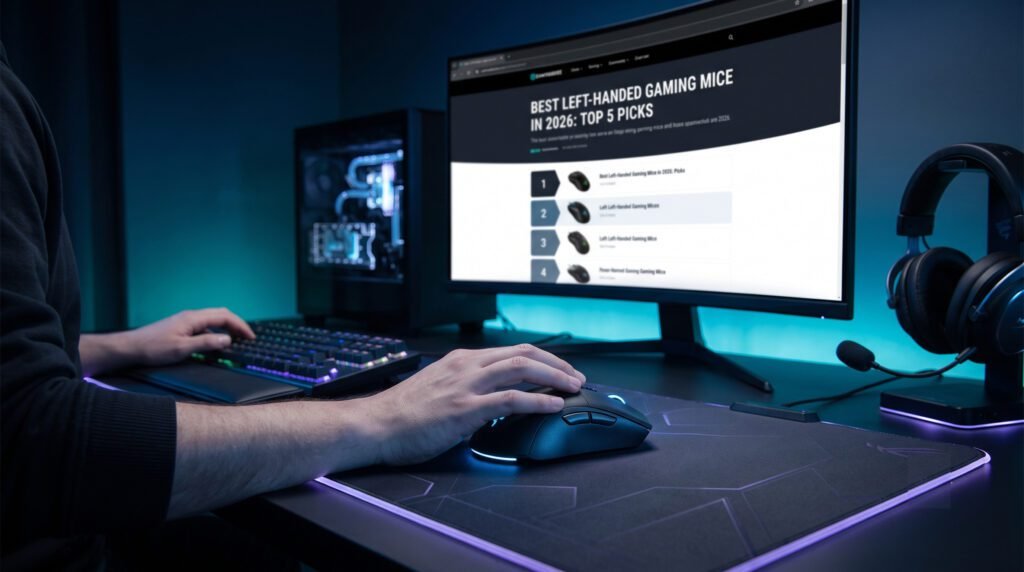
A mouse can look perfectly symmetrical and still be wrong for a left hand. The reason is simple: your left thumb rests on the right edge of the mouse, so that is where the side buttons need to be.
This guide ranks five mice by that one test. It shows where each pick’s thumb buttons sit, what software can and can’t fix, and what is still made for left hands. GameVexo doesn’t test mice hands-on. Every spec and layout here comes from the manufacturer pages and named reviews below.
Quick Answer
The Razer Naga Left-Handed Edition is the only true left-handed shape on this list, with a 12-button thumb grid on the right edge. If you want wireless, the Logitech G PRO 2 LIGHTSPEED is the pick, because its magnetic side buttons can be placed on either edge.
Quick Picks by Need
- Only True Left-Handed
Razer Naga Left-Handed Edition
Mirrored left-hand shape, 12-button thumb grid. Wired only.
View on Amazon Paid link - Best Wireless Ambidextrous
Logitech G PRO 2 LIGHTSPEED
80 g symmetric shell. Magnetic buttons can go on the right edge.
View on Amazon Paid link - Best Wired Ambidextrous
Corsair M55 RGB Pro
Buttons on both edges, plus an iCUE left-hand mode.
View on Amazon Paid link
Our picks at a glance
The second column is the one most lists skip: which edge the thumb buttons sit on. Picks are ordered by how well that edge fits a left hand.
| Product | Thumb buttons (left hand) | Weight · Connection | Best For | Link |
|---|---|---|---|---|
| Razer Naga Left-Handed Edition True Left-Handed | Right edge · 12-button grid | 109 g · Wired | MMO, many keybinds | Amazon Paid link |
| Logitech G PRO 2 LIGHTSPEED Wireless | Right edge · attach the right pair | 80 g · Wireless | Wireless FPS, MOBA | Amazon Paid link |
| Corsair M55 RGB Pro Wired | Both edges · 2 each | 86 g (no cable) · Wired | Wired, buttons on both edges | Amazon Paid link |
| Logitech G PRO Wireless | Right edge · removable buttons | 80 g · Wireless | Older wireless esports shape | Amazon Paid link |
| Logitech G305 LIGHTSPEED | Left edge only (out of reach) | 99 g with AA · Wireless | Lefties who skip thumb buttons | Amazon Paid link |
True left-handed vs. ambidextrous
A true left-handed mouse is shaped for a left hand. Its thumb rest and buttons sit on the right edge, and it can’t be flipped for a right hand. Razer describes the Naga Left-Handed Edition this way.
An ambidextrous mouse has a symmetrical shell, so it feels the same in either hand. That says nothing about the buttons. That gives three types on this list: true left-handed (the Naga), ambidextrous with buttons you can place (G PRO 2, G PRO Wireless, M55), and a compact shell with buttons on one edge (the G305).

Why the button side matters
Hold a mouse in your left hand. Your thumb rests on the right edge, and your ring finger and pinky sit on the left.
Thumb buttons often hold push-to-talk, ability binds, forward and back, or MMO hotkeys. On a right-handed layout they sit on the left edge, out of reach of a left thumb, and your pinky can press them by accident.

Quick check: in the listing’s top-down photo, with the scroll wheel up, buttons on the right edge suit a left thumb.
On ambidextrous mice the unused set can sit under your fingers, so removable covers (Logitech) or a hand mode (Corsair iCUE) help.
The five picks
Specs are manufacturer-listed unless a source is named. The images are schematic illustrations of each button layout, not product photos.

#1 — Only True Left-Handed
Razer Naga Left-Handed Edition
Left-handed MMO and keybind-heavy playersA left-handed shell with a 12-button thumb grid on the right edge.
- Brand
- Razer
- Thumb buttons
- Right edge, 12-button grid
- Weight
- 109 g
- Connection
- Wired (Speedflex cable)
- Sensor
- Focus+ optical, up to 20,000 DPI
- Buttons
- 19+1 programmable
Pros
- Built for a left hand
- 12-button grid on the right edge
- Five onboard profiles
Cons
- Wired only
- Heaviest here at 109 g, with no swappable panels (GamesRadar)
Our Editorial Opinion
The only mouse here where nothing about the layout is a workaround. Best if you want many thumb buttons.
Illustration, not a product photo
Razer calls this a true left-handed design, with its 12-button thumb grid placed for a left hand. bit-tech puts the grid on the right side. Razer lists 19+1 programmable buttons, a 20,000 DPI Focus+ sensor and five onboard profiles. The trade-off is size: GamesRadar lists 109 g, and Amazon lists 119 × 75 × 43 mm. Razer labels it “Only at Razer,” so check the seller on other stores.
Price changes frequently — check Amazon for the latest deal.

#2 — Best Wireless Ambidextrous
Logitech G PRO 2 LIGHTSPEED
Left-handed FPS and MOBA players who want wirelessA symmetric 80 g shell with magnetic side buttons you can put on the right edge.
- Brand
- Logitech G
- Thumb buttons
- Magnetic, either edge
- Weight
- 80 g
- Connection
- LIGHTSPEED wireless, USB-C
- Sensor
- HERO 2, up to 44K DPI
- Battery
- Up to 95 h (60 h with lighting)
Pros
- Buttons for either edge
- Optional button covers in the box
- USB-C charging
Cons
- 8 kHz needs a separate receiver
- 80 g is mid-weight. Logitech lists its PRO X Superlight 2 at 60 g
Our Editorial Opinion
The best wireless fit: your thumb buttons sit where a left thumb is. Just attach the right-hand pair.
Illustration, not a product photo
Logitech calls this a symmetric, ambidextrous mouse with customizable magnetic side buttons. Retailer listings say the box holds two optional buttons per edge, so a left-handed player attaches the right-hand pair. Logitech lists the HERO 2 sensor at up to 44K DPI. Retailers give up to 95 hours of battery with lighting off and 60 with it on. Logitech says 8 kHz polling needs a separate receiver.
🔗 Pairs well with: best white gaming mouse: 5 picks that stay white (retailers list this model in white)
Price changes frequently — check Amazon for the latest deal.

#3 — Best Wired Ambidextrous
Corsair M55 RGB Pro
Left-handed players who want wired, with buttons on both edgesTwo thumb buttons on each edge, plus an iCUE left-handed mode.
- Brand
- Corsair
- Thumb buttons
- Both edges, 2 each
- Weight
- 86 g without cable
- Connection
- Wired USB-A, braided cable
- Sensor
- PixArt optical, up to 12,400 DPI
- Switches
- Omron, 50M clicks
Pros
- Buttons already on both edges
- iCUE left/right-hand mode
- No battery to charge
Cons
- Wired only
- Hand mode is set in iCUE
Our Editorial Opinion
A simple wired choice if you want buttons on the right edge without swapping parts.
Illustration, not a product photo
Corsair lists the M55 RGB Pro as ambidextrous with eight programmable buttons. Tom’s Hardware describes two buttons on each side by the thumb rest and says iCUE can enable left-handed mode and all side buttons. Corsair’s retail copy lists 12,400 DPI, Omron switches rated for 50 million clicks and 86 g without the cable. Nothing needs attaching.
Price changes frequently — check Amazon for the latest deal.

#4 — Older Ambidextrous Esports Shape
Logitech G PRO Wireless
Left-handed claw-grip players who want a proven 80 g wireless shapeRemovable buttons on both edges: choose none, left, right, or both.
- Brand
- Logitech G
- Thumb buttons
- Removable, either edge
- Weight
- 80 g
- Connection
- LIGHTSPEED wireless
- Sensor
- HERO 25K, up to 25,600 DPI
- Battery
- Up to 60 h (48 h with lighting)
Pros
- Buttons on the right edge, the left, both or neither
- 80 g body
- DPI button on the underside (Amazon)
Cons
- Older than the G PRO 2
- Lower battery rating (60 h vs. 95 h, lighting off)
Our Editorial Opinion
Solid if you prefer this shape. Check the condition you are buying.
Illustration, not a product photo
Logitech says it built this shape with more than 50 pro players and that removable buttons make it ambidextrous, from zero to four side buttons. It lists 80 g, the HERO 25K sensor at up to 25,600 DPI, and up to 60 hours of battery with lighting off. It is the older of the two Logitech ambidextrous mice here, and some Amazon listings are Renewed units.
Price changes frequently — check Amazon for the latest deal.

#5 — Wireless, Thumb Buttons Optional
Logitech G305 LIGHTSPEED
Left-handed players who don’t use thumb buttonsA 250-hour AA battery rating, but both side buttons are on the left edge.
- Brand
- Logitech G
- Thumb buttons
- Left edge only
- Weight
- 99 g with AA battery
- Connection
- LIGHTSPEED wireless
- Sensor
- HERO, up to 12,000 DPI
- Battery
- Up to 250 h on 1 AA
Pros
- Up to 250 h on one AA (Logitech)
- LIGHTSPEED wireless
- 10M-click primary switches (Logitech)
Cons
- Side buttons on the left edge only
- 99 g, second-heaviest here
Our Editorial Opinion
Only if thumb buttons don’t matter to you. Otherwise the mice above fit a left hand better.
Illustration, not a product photo
Logitech lists 99 g, a HERO sensor, six programmable buttons and about 250 hours from one AA. Independent reviewers (Gaming Review Hub, Vivid Repairs) report both side buttons on the left edge only, out of reach of a left thumb. Logitech doesn’t name the edge, and spec sheets disagree on the shell’s symmetry. Treat it as a pick for lefties who skip side buttons.
Price changes frequently — check Amazon for the latest deal.
Software remapping as a workaround
Software can help a left-handed player, but it changes what a button does, not where it sits.
Swap the primary button in Windows
Windows can make the right button the main click under Settings > Bluetooth & devices > Mouse, per Microsoft Support. It only swaps the two main buttons.
Use the maker’s app
Razer Synapse, Logitech G HUB and Corsair iCUE remap buttons. Corsair’s retail copy says iCUE can switch the M55 between left- and right-handed modes.
What remapping can’t do
It can’t move a button. On the G305 you can reassign the left-edge buttons, but your left thumb still can’t reach them. If thumb buttons matter, fix it with hardware.
What is genuinely still made left-handed
Very little. Among the Razer, Logitech and Corsair mice we checked, one gaming mouse has a mirrored left-handed shape: the Naga Left-Handed Edition, which Razer’s US store lists as current. Per the Naga’s history on Wikipedia, Razer brought it back in 2020 after an earlier version was discontinued.
A left-handed DeathAdder V3 Pro
Razer’s V3 Pro page describes a right-handed shape, and Tom’s Hardware reported at its 2022 review that Razer had no plans for a left-handed one. Some online guides still list one. We found none on Razer’s site.
Logitech Lift Left
A left-handed vertical mouse. Retailers describe it as an ergonomic work mouse, not a gaming mouse.
Buying guide: a quick checklist
Find the button edge
Check the listing’s top-down photo. Buttons should be on the right edge, or placeable there.
Choose wired or wireless
The Naga and M55 are wired. The G PRO 2, G PRO Wireless and G305 are wireless, rated up to 95, 60 and 250 hours.
Match the size to your hand
Listed widths: G305 62.15 mm, G PRO 2 63.5 mm, Naga 75 mm. Wider mice tend to suit palm grips, narrower ones claw and fingertip grips.
Check noise and color
Not ranked here. See our best silent gaming mouse: 5 genuinely quiet picks or best white gaming mouse: 5 picks that stay white.

How GameVexo chose
How GameVexo chose these picks
Evidence basis: Research-based. GameVexo did not test, handle, weigh or photograph these mice.
What came from documentation: Specs come from Razer’s Naga page, Logitech’s G PRO 2 and G PRO Wireless pages, Corsair’s M55 page, retailer listings for the G305, and Amazon listings for product identity. Battery figures are manufacturer ratings.
Independent evidence: Tom’s Hardware (M55, DeathAdder V3 Pro), bit-tech (Naga grid), GamesRadar (Naga weight), and Gaming Review Hub and Vivid Repairs (G305 buttons). All are attributed. None is a GameVexo measurement.
How picks are chosen: Can a left thumb reach the buttons? Is the shape left-handed, or ambidextrous with placeable buttons? Then wired vs. wireless, weight and size. Affiliate links don’t affect the order.
Frequently Asked Questions
What is the best left-handed gaming mouse?
It depends on the buttons you need. The Razer Naga Left-Handed Edition is the only true left-handed shape here. For wireless, the Logitech G PRO 2 LIGHTSPEED lets you place buttons on the right edge. For wired, the Corsair M55 RGB Pro has buttons on both edges.
Is an ambidextrous mouse the same as a left-handed mouse?
No. Ambidextrous means the shell is symmetrical. It doesn’t say where the side buttons are. Check that there are buttons on the right edge, or a way to put them there.
Can software make a right-handed mouse work for a left hand?
Only partly. Windows can make the right button the main click, and maker apps can reassign buttons. None can move a physical button or reshape the mouse.
Is the Logitech G305 good for left-handed gamers?
Only if you don’t use thumb buttons. Independent reviewers report both side buttons on the left edge, where a left thumb can’t reach them.
Final Verdict — Which Should You Buy?
Start with the button edge, then choose wired or wireless.
| If You Need… | Best Pick | Key Spec | Buy |
|---|---|---|---|
| A true left-handed shape | Razer Naga Left-Handed Edition | 12-button grid | Amazon Paid link |
| Wireless, buttons on the right edge | Logitech G PRO 2 LIGHTSPEED | 80 g, magnetic buttons | Amazon Paid link |
| Wired, buttons on both edges | Corsair M55 RGB Pro | 86 g without cable | Amazon Paid link |
| An older proven wireless shape | Logitech G PRO Wireless | 80 g, up to 60 h | Amazon Paid link |
| Wireless, no thumb buttons | Logitech G305 LIGHTSPEED | 99 g, up to 250 h | Amazon Paid link |
Which one fits your setup? Let us know in the comments below. 👇
A note on what GameVexo could not verify: GameVexo has not handled these mice. Button edges come from manufacturer descriptions and named reviews, not from GameVexo checking product photos. The Naga’s 109 g comes from GamesRadar because Razer’s spec tab didn’t load. Logitech doesn’t name the G305’s button edge. Retailers list the G PRO 2 at 32,000 or 44,000 DPI, and we used Logitech’s 44K. Battery figures are ratings. We did not check prices, stock or sellers.
Explore


Article engagement
Comments (0)
No comments yet. Be the first to share what you think.
Sign in to join the conversation.