
Mouse Pad Sizes Explained: Size Chart in mm and Inches & Best Small Pads
Mouse pad sizes explained: the full chart from small (220×180mm) to XXL (900×400mm), plus how to pick the right size for your desk and DPI in 2026.

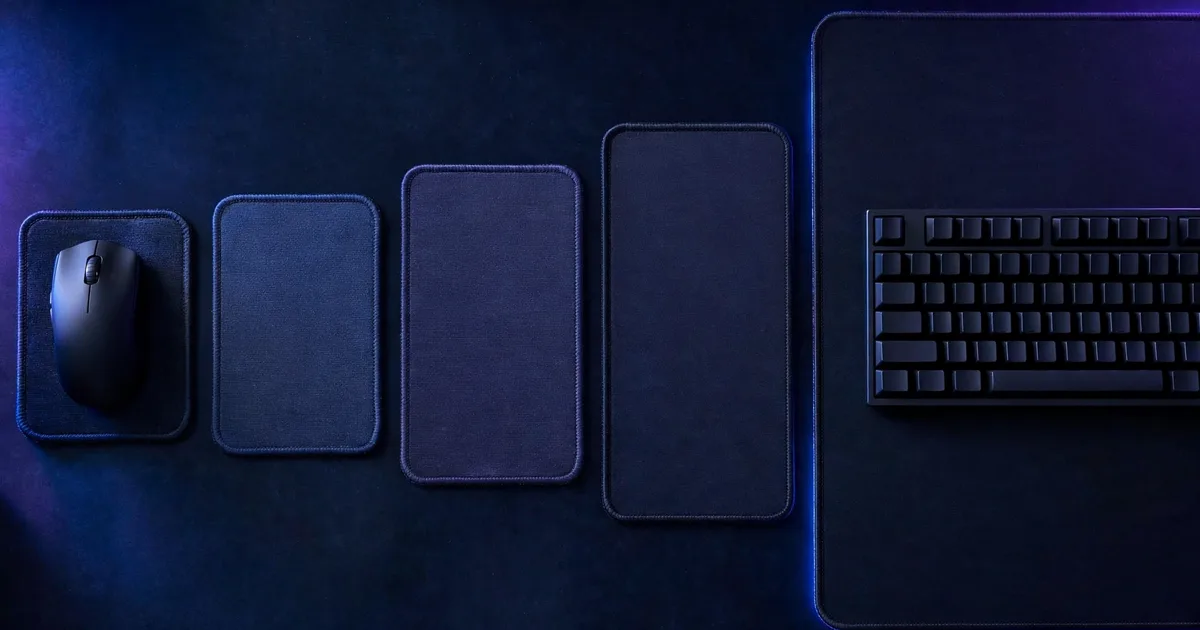
Mouse pad sizes are more confusing than they should be. Small, standard, and XXL mean something slightly different on every product page, so a pad that looked perfect in the photos can arrive too small for your mouse — or too big for your desk. This guide clears that up with the full mouse pad sizes chart in millimetres and inches, a simple way to work out which row fits your desk and your play style, and five small pads worth buying when space is tight.
Updated — new title, size chart and small-pad picks refreshed
Short answer
Standard mouse pad sizes run about 300×250mm (11.8×9.8in), small pads measure 220×180mm to 260×210mm, and the right size for you depends on your desk space and your mouse sensitivity: low-DPI FPS players need a large or XXL pad, while high-DPI players and office users are fine on a small or medium one.
Find your pick at a glance
-
Best overall
Logitech Studio Series Small Mouse Pad
A 9×8in cloth pad with a non-slip rubber base that fits almost any desk.
-
Best value
TECKNET Small Mousepad
Stitched edges and a waterproof coating, in a slightly roomier 10.6×8.3in size.
-
Best for gaming
Logitech G240 Cloth Gaming Mouse Pad
The 340×280mm size gaming pads are built around, with heat-treated cloth for steady tracking.
Who this guide is for
This guide is for anyone buying a mouse pad who wants to know the size before they order: office workers with a small desk, laptop users, and gamers who need room for full arm movement.
This is for you if
- Your desk is small or shared, and the pad has to fit beside a keyboard and a notebook.
- You play FPS games at low sensitivity and your arm sweeps across the pad on every turn.
- You work long hours at a desk and want a pad that fits your wrist and your mouse, not just your mouse.
Look elsewhere if
- You want a full desk mat that holds your keyboard and mouse — see our best XXL mouse pad guide instead.
- You are choosing between cloth and glass surfaces — the size chart below still applies, but our best glass gaming mouse pad guide decides that part.
Check this before you buy
Measure your desk before you measure the pad. A pad that fits your mouse but hangs off the desk edge will curl, slide, and wear out fast.
Three things to check
- Your desk space Measure the free width and depth where the pad will sit, with the keyboard in place. A small pad needs about 10in of width; an XXL mat needs a desk at least 36in wide.
- Your DPI and sensitivity Low sensitivity means big arm movements, so you need a bigger pad. High sensitivity means small wrist movements, so a small pad is enough.
- Your surface and base Cloth suits most players and is quiet; hard and glass surfaces trade comfort for lower friction. Whichever you pick, the base must grip your desk — a pad that creeps forward while you play is the wrong pad.
Building more than one piece? Plan the rest of your setup in the Setup Builder before you order.
How these picks were chosen
The five picks below are the small pads from the live page, kept because their sizes check out, with the size bands re-checked against the dimensions manufacturers state for their own pads.
How we researched this
- Size bands in the chart come from the dimensions manufacturers state for their own pads, grouped into the five bands most makers use; there is no single official standard.
- Each pick’s size, surface, base and edge finish come from the maker’s spec sheet or product manual, re-checked for this update where a standalone page exists (Logitech G240, TECKNET manual).
- The live page’s testing and top-seller claims were removed in this update: GameVexo does not physically test products, and this guide makes no price, rating or availability claims.
- Specifications and rated figures come from manufacturer documentation. GameVexo does not physically test products — see how we research.
Mouse pad sizes: the full size chart
There is no single official standard — no ISO number stamped on every mouse pad box. But after checking specs across dozens of listings, manufacturers consistently group pads into five size bands. Here is the full mouse pad sizes chart in both millimetres and inches.
| Size | Millimetres | Inches | Best for |
|---|---|---|---|
| Small | 220×180 – 260×210mm | 8.7×7.1 – 10.2×8.3in | High-DPI gaming, tight desks, travel |
| Medium (Standard) | 300×250 – 350×270mm | 11.8×9.8 – 13.8×10.6in | Everyday office and home use |
| Large | 450×400mm | 17.7×15.7in | Low and mid-DPI gaming |
| XL / Extended | 600×300 – 800×300mm | 23.6×11.8 – 31.5×11.8in | Keyboard and mouse combo |
| XXL / Full Desk | 900×400mm and larger | 35.4×15.7in and larger | Full-desk coverage, streaming setups |
What the table does not show
Most manufacturers round to the nearest 10mm, so do not stress over hitting an exact number — landing within about 10–15mm of the range you need is close enough for any real-world desk.

If your setup calls for that last row, we cover it in more depth in our best XXL mouse pad guide — for the rest of this guide, we are focused on the small end of the chart, which is what most people searching mouse pad sizes actually end up buying.
What size mouse pad do you actually need?
The size chart tells you what is out there — this section tells you which row applies to you. It comes down to three things: your desk space, your mouse sensitivity (DPI), and whether you are gaming or just working.
Do not just eyeball your pad against your mouse — match it to your full arm and wrist movement range, especially if you play FPS games at low sensitivity. A pad that looks big enough in a photo can run out of room the first time you flick a 180.

Low-DPI or competitive FPS gamers
If you play at low DPI and sensitivity — common in CS2, Valorant, Overwatch, and similar titles — your whole arm moves across the pad on every turn. A small pad will run out of room fast; size up to a large or XXL pad instead.
Tight desks and laptop setups
If your desk is small or you are working off a laptop tray, a small pad (roughly 8–10in wide) keeps your setup compact without limiting daily browsing, typing, and design work.
Office and everyday use
For spreadsheets, email, and browsing, your cursor sensitivity is high enough that a small or medium pad gives plenty of room — save the extra desk space for your keyboard and coffee.
Quick comparison
The five small pads in this guide, compared on the size that decides the purchase.
| Product | Size | Surface | Best for | Link |
|---|---|---|---|---|
| Logitech Studio SeriesBest overall | 9×8in | Cloth, rubber base | Everyday reliability | Amazon Paid link |
| TECKNET Small MousepadBest value | 10.6×8.3in | Waterproof coated, rubber base | Budget buyers | Amazon Paid link |
| Logitech G240Best for gaming | 13.4×11in (340×280mm) | Heat-treated cloth | Gaming / esports | Amazon Paid link |
| MROCO Ergonomic Wrist Rest | 9.4×8.1in | Lycra and gel wrist rest | Wrist comfort / office | Amazon Paid link |
| ZYAOTWQZ Pink Mouse Pad | 10.2×8.2in | Splash-proof textured | Aesthetic / design | Amazon Paid link |
What the table does not show
A spec sheet cannot show how a surface feels under your hand, or how a gel wrist rest feels after six hours. Size gets you the right row; the cards below cover the feel.

Pick 1 · Best overall
Logitech Studio Series Small Mouse Pad (Graphite)
Best for everyday desks that just need a reliable small padA 9×8in cloth pad with an anti-slip rubber base, from a brand most desks already trust. The fine-weave cloth glides smoothly under laser and optical mice, and the flat-stitched edges resist fraying after months of daily use.
- Size
- 9 x 8 in
- Surface
- Cloth, spill-repellent
- Base
- Anti-slip rubber
- Edges
- Flat-stitched
- Colours
- Graphite, Grey, Blue Grey
- Brand
- Logitech
Strengths
- Smooth, consistent glide for daily use
- Genuinely non-slip rubber base
- Spill-repellent coated surface
- Fits almost any small desk
Trade-offs
- Only one size available
- No wrist support
- Limited colour options
Editorial opinion
If you just want a small pad that works and will not need replacing in six months, this is it. It is not flashy, but it is the safest pick on this list for everyday office or home use.
Price and availability change often — check the current listing.
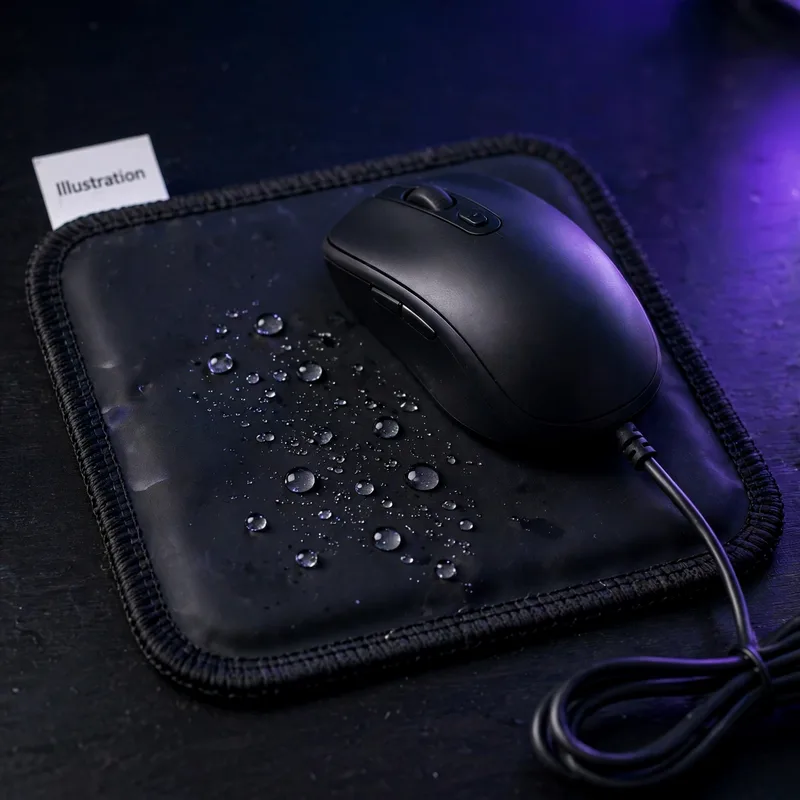
Pick 2 · Best value
TECKNET Small Mousepad, Anti-Fray Stitching (Black)
Best for budget shoppers who still want stitched edges and a real rubber baseA 10.6×8.3in waterproof-coated pad with durable anti-fray stitching, slightly larger than most small pads. It has the same stitched edges and non-slip rubber base you would expect from pads costing twice as much, plus a waterproof coating that beads up spilled drinks instead of soaking into the surface.
- Size
- 10.6 x 8.3 in (270 x 210 mm)
- Surface
- Waterproof coated
- Thickness
- 0.12 in (3 mm)
- Base
- Non-slip rubber
- Edges
- Anti-fray stitched
- Brand
- TECKNET
Strengths
- Very affordable
- Waterproof coating
- Slightly larger than most small pads
- Multiple colours available
Trade-offs
- Cloth wears faster under heavy daily use
- Thinner than gaming-specific pads
- Base grip is good, not class-leading
Editorial opinion
For the price, there is very little to complain about. It is the pick if you need two or three pads for a shared desk or a kid’s setup and do not want to spend much per pad.
Price and availability change often — check the current listing.

Pick 3 · Best for gaming
Logitech G240 Cloth Gaming Mouse Pad
Best for gamers who want the 340×280mm size gaming pads are built aroundThe reference point for standard gaming mouse pad size — 340×280mm, noticeably roomier than a typical small office pad. Logitech heat-treats the cloth surface for a consistent texture that keeps optical and laser sensors tracking accurately, and the rubber base stays anchored during fast flick shots.
- Size
- 340 x 280 mm (13.4 x 11 in)
- Surface
- Heat-treated cloth
- Thickness
- 1 mm
- Base
- Non-slip rubber
- Warranty
- 1-year limited
- Brand
- Logitech G
Strengths
- True standard gaming size with room to spare
- Consistent sensor tracking
- Thin and rollable for travel
- Trusted gaming brand
Trade-offs
- Thin profile means less cushioning
- Only available in black
- Not built to also fit a keyboard
Editorial opinion
If the keyword that brought you here was standard mouse pad size and you game even casually, this is the pad that size chart is describing. It is the safe, proven choice.
Price and availability change often — check the current listing.

Pick 4 · Best for wrist comfort
MROCO Ergonomic Mouse Pad with Gel Wrist Rest (Black)
Best for long work sessions and anyone dealing with wrist strainA 9.4×8.1in pad with a gel-filled wrist rest built into the base. The attached gel cushion sits just below the mousing surface, so your wrist rests in a slightly raised, supported position instead of pressing flat against the desk edge.
- Size
- 9.4 x 8.1 in
- Surface
- Lycra cloth
- Wrist rest
- Gel-filled
- Base
- Non-slip PU
- Compatible
- Wired, wireless, optical and mechanical mice
- Brand
- MROCO
Strengths
- Reduces wrist pressure on long sessions
- Smooth, precise tracking surface
- Non-slip base holds position
- Works with any mouse type
Trade-offs
- Bulkier than a flat small pad
- Gel feels firm until warmed to room temperature
- Not ideal for fast-flick gaming
Editorial opinion
Not a gaming pad — it is an ergonomics pad that happens to also be a mouse pad. If you sit at a desk six or more hours a day, this is worth the small trade-off in footprint.
Price and availability change often — check the current listing.

Pick 5 · Best design
ZYAOTWQZ Pink Mouse Pad, Splash-Proof
Best for anyone who wants their small mouse pad to actually look good on their deskA 10.2×8.2in splash-proof textured pad with a soft pink finish. The stitched edge and non-slip rubber base are on par with the plainer pads on this list; you are really just paying for the look — and it is a good look.
- Size
- 10.2 x 8.2 in
- Surface
- Splash-proof textured
- Base
- Non-slip rubber
- Edges
- Stitched
- Style
- Pink / aesthetic
- Brand
- ZYAOTWQZ
Strengths
- Genuinely nice desk aesthetic
- Splash-proof surface
- Comparable performance to plain pads
- Good gift option
Trade-offs
- Only really available in pink and pastel tones
- Texture shows fingerprints and dust
- Niche if you want a serious gaming look
Editorial opinion
If two pads perform about the same, buy the one you actually like looking at. This is that pad.
Price and availability change often — check the current listing.
What to look for before you buy
Once you know your general size range, these four factors decide whether a specific pad is actually a good buy.
Desk space and setup
Measure your desk before you measure the pad. A small pad (8–10in) leaves room for a notebook or a coffee cup; go any larger and you may need to shift your keyboard back to fit both comfortably.
Surface material: cloth vs hard vs glass
Cloth pads, like most on this list, give consistent, quiet glide and work well with nearly every mouse — see our best cloth mouse pad picks for more fabric-surface options. Hard plastic and glass pads trade some comfort for even lower friction and faster tracking — see our best glass gaming mouse pad guide if that sounds more like your style.
DPI and sensitivity
Higher DPI and sensitivity means smaller physical mouse movements, so a small pad is genuinely enough for most people — you do not need to size up just because a pad looks small in photos.
The number to ignore: max DPI on the box
A mouse rated at 26,000 DPI sounds fast; you will play at 800 or 1,600. Buy the pad for your desk and your sensitivity, not for a DPI number you will never use.
Key terms, explained
Three terms that trip buyers up when they read a size chart.
- DPI
- Dots per inch: how far your cursor moves on screen for each inch your mouse moves on the pad. Higher DPI means smaller hand movements; most players use 400 to 1,600 DPI.
- Sensitivity
- How your game turns DPI into turning speed. Low sensitivity means your whole arm moves to turn around, which is why low-sensitivity players need a bigger pad.
- Desk mat (extended / XXL pad)
- A pad wide enough to hold your keyboard and your mouse on one surface, usually 800×300mm or larger. It is a size band, not a different product.
Mistakes that cost gamers money
The single most expensive mistake in this category is buying the wrong size twice: a small pad that runs out of room, then a desk mat that does not fit the desk.
- Buying a small pad for low-DPI FPS playYour arm sweeps further than the pad on every 180-degree turn, so you lift and reset mid-fight. Check your sensitivity first, then the chart.
- Measuring the mouse, not the deskA pad that fits your mouse but hangs off the desk edge curls, slides, and wears out fast. Measure the free space with the keyboard in place.
- Paying for a size you cannot useAn XXL desk mat sounds like an upgrade until it covers your notebook, your coffee, and half your keyboard tray. Bigger is only better if your desk is big enough.
- Ignoring the baseA smooth top means nothing if the pad creeps forward while you play. A rubber or PU base that grips your desk surface is part of the size decision, not an extra.
Setup and upkeep
Unroll a new pad flat and let it sit for a day before you play on it, so the edges lie flat. Wipe a cloth pad with a damp cloth and mild soap, then air-dry it flat. For a full routine, see our guide on how to wash a mouse pad.
Frequently asked questions
What is the standard mouse pad size?
About 300×250mm (11.8×9.8in). That is the most common standard size, though many pads sold as standard or medium range from 300×250mm up to 350×270mm (13.8×10.6in). If a listing only says standard, check the millimetres before you order, because the word alone means different things on different pages.
What size mouse pad do I need for gaming?
For most gaming, a large pad (450×400mm) or the classic gaming-standard size (340×280mm, like the Logitech G240) gives enough room for full arm movement at low-to-mid DPI. If you play at high sensitivity or have a small desk, a small pad around 9×8in is genuinely enough.
Is a small mouse pad bad for gaming?
No, not always. A small mouse pad works fine for high-DPI, high-sensitivity gaming, where your mouse only moves an inch or two per swipe. It becomes a problem mainly for low-DPI, low-sensitivity play, common in competitive FPS titles, where your whole arm sweeps across the pad.
What size is an XXL or extended mouse pad?
XXL or extended mouse pads, also called desk mats, typically measure 900×400mm (35.4×15.7in) or larger, big enough to fit both your keyboard and mouse on one surface. Measure your desk first: an XXL mat needs a desk at least 36in wide to sit flat without hanging off the edge.
So which one should you buy?
Buy the size first and the pad second. Measure your desk, check your sensitivity, then pick from the chart — and if your desk is tight, the Logitech Studio Series is the small pad most people should default to.
| If you need | Best pick | Why | Link |
|---|---|---|---|
| Best overall small pad | Logitech Studio Series | 9×8in, cloth and rubber base | Amazon Paid link |
| Best value | TECKNET Small Mousepad | 10.6×8.3in, waterproof coating | Amazon Paid link |
| Best for gaming (standard size) | Logitech G240 | 340×280mm, heat-treated cloth | Amazon Paid link |
| Best for wrist comfort | MROCO Ergonomic Wrist Rest | 9.4×8.1in, gel wrist rest | Amazon Paid link |
| Best design / aesthetic | ZYAOTWQZ Pink Mouse Pad | 10.2×8.2in, splash-proof | Amazon Paid link |
Still deciding? Answer a few questions in Help me choose and GameVexo will narrow it down by your games, platform and budget.
Where to go next
- Best XXL Mouse Pad 2026The full-desk upgrade path when a small pad runs out of room.
- Best Glass Gaming Mouse PadA hard-surface alternative when you want lower friction than cloth.
- Best Gaming Mouse Pad with Wrist SupportMore wrist-rest pads for long sessions at a desk.
- Best Gaming Desk MatFive desk mats measured against your desk, from XXL to full coverage.
Explore


Article engagement
Comments (0)
No comments yet. Be the first to share what you think.
Sign in to join the conversation.